
HTML Introduction
HTML is the standard markup language for creating Web pages.
What is HTML?
- HTML stands for Hyper Text Markup Language
- HTML is the standard markup language for creating Web pages
- HTML describes the structure of a Web page
- HTML consists of a series of elements
- HTML elements tell the browser how to display the content
- HTML elements label pieces of content such as "this is a heading", "this is a paragraph", "this is a link", etc.
A Simple HTML Document
Example
<!DOCTYPE html>
<html>
<head>
<title>Page Title</title>
</head>
<body>
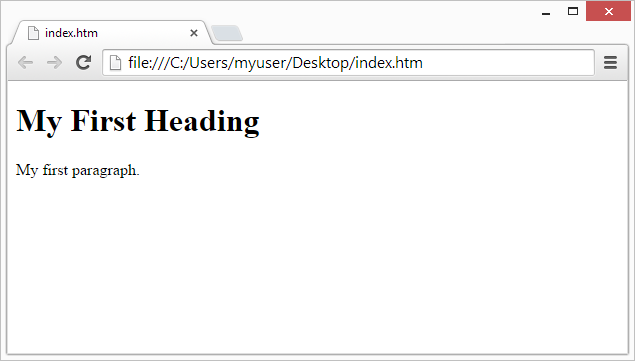
<h1>My First Heading</h1>
<p>My first paragraph.</p>
</body>
</html>
Try it Yourself »
Example Explained
- The
<!DOCTYPE html>declaration defines that this document is an HTML5 document - The
<html>element is the root element of an HTML page - The
<head>element contains meta information about the HTML page - The
<title>element specifies a title for the HTML page (which is shown in the browser's title bar or in the page's tab) - The
<body>element defines the document's body, and is a container for all the visible contents, such as headings, paragraphs, images, hyperlinks, tables, lists, etc. - The
<h1>element defines a large heading - The
<p>element defines a paragraph
What is an HTML Element?
An HTML element is defined by a start tag, some content, and an end tag:
The HTML element is everything from the start tag to the end tag:
| Start tag | Element content | End tag |
|---|---|---|
| <h1> | My First Heading | </h1> |
| <p> | My first paragraph. | </p> |
| <br> | none | none |
Note: Some HTML elements have no content (like the <br> element). These elements are called empty elements. Empty elements do not have an end tag!
Web Browsers
The purpose of a web browser (Chrome, Edge, Firefox, Safari) is to read HTML documents and display them correctly.
A browser does not display the HTML tags, but uses them to determine how to display the document:
HTML Page Structure
Below is a visualization of an HTML page structure:
Note: The content inside the <body> section will be displayed in a browser. The content inside the <title> element will be shown in the browser's title bar or in the page's tab.
HTML History
Since the early days of the World Wide Web, there have been many versions of HTML:
| Year | Version |
|---|---|
| 1989 | Tim Berners-Lee invented www |
| 1991 | Tim Berners-Lee invented HTML |
| 1993 | Dave Raggett drafted HTML+ |
| 1995 | HTML Working Group defined HTML 2.0 |
| 1997 | W3C Recommendation: HTML 3.2 |
| 1999 | W3C Recommendation: HTML 4.01 |
| 2000 | W3C Recommendation: XHTML 1.0 |
| 2008 | WHATWG HTML5 First Public Draft |
| 2012 | WHATWG HTML5 Living Standard |
| 2014 | W3C Recommendation: HTML5 |
| 2016 | W3C Candidate Recommendation: HTML 5.1 |
| 2017 | W3C Recommendation: HTML5.1 2nd Edition |
| 2017 | W3C Recommendation: HTML5.2 |
This tutorial follows the latest HTML5 standard.
Video: HTML Introduction



