
jQuery width() Method
Example
Return the width of a <div> element:
$("button").click(function(){
alert($("div").width());
});
Try it Yourself »
Definition and Usage
The width() method sets or returns the width of the selected elements.
When this method is used to return width, it returns the width of the FIRST matched element.
When this method is used to set width, it sets the width of ALL matched elements.
As the image below illustrates, this method does not include padding, border, or margin.
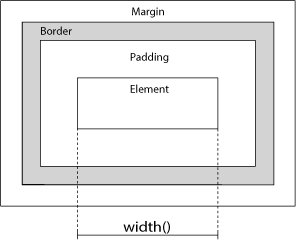
Related methods:
- height() - Sets or returns the height of an element
- innerWidth() - Returns the width of an element (includes padding)
- innerHeight() - Returns the height of an element (includes padding)
- outerWidth() - Returns the width of an element (includes padding and border).
- outerHeight() - Returns the height of an element (includes padding and border).
Syntax
Return the width:
$(selector).width()
Set the width:
$(selector).width(value)
Set the width using a function:
$(selector).width(function(index,currentwidth))
| Parameter | Description |
|---|---|
| value | Required for setting width. Specifies the width in px, em, pt, etc. Default unit is px |
| function(index,currentwidth) | Optional. Specifies a function that returns the new width of selected elements
|
Try it Yourself - Examples
Set the width of an element
How to set the width of an element using different units.
Decrease the width using a function
How to use a function to decrease the width of an element.
Return the width of the document and window elements
How to return the current width of the document and window elements.
Display dimensions with related methods
How to use width(), height(), innerHeight(), innerWidth(), outerWidth() and outerHeight().
Responsive Design with width()
How to change the background color of the page on smaller screens.


