jQuery outerHeight() Method
Example
Return the outer height of a <div> element:
$("button").click(function(){
alert($("div").outerHeight());
});
Try it Yourself »
Definition and Usage
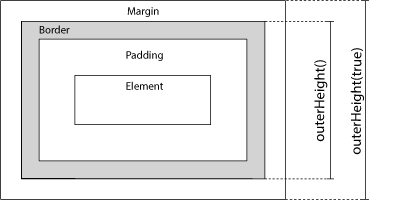
The outerHeight() method returns the outer height of the FIRST matched element.
As the image below illustrates, this method includes padding and border.
Tip: To include the margin, use outerHeight(true).
Related methods:
- width() - Sets or returns the width of an element
- height() - Sets or returns the height of an element
- innerWidth() - Returns the width of an element (includes padding)
- innerHeight() - Returns the height of an element (includes padding)
- outerWidth() - Returns the width of an element (includes padding and border).
Syntax
$(selector).outerHeight(includeMargin)
| Parameter | Description |
|---|---|
| includeMargin | Optional. A Boolean value specifying whether or not to include the margin
|
Try it Yourself - Examples
Include the margin
Specifiy whether or not to include the margin.
Display dimensions with related methods
How to use width(), height(), innerHeight(), innerWidth(), outerWidth() and
outerHeight().

