Web Development Project: My First Website
Build a Simple Multi-Page Website
Time to put everything together! You'll build a small, three-page website using only HTML features you've learned.
Tip: You can do this in your own folder (local), in W3Schools Spaces, or using the Try It Yourself Editor for each step.
When you finish the project, your page will look like this. In the next section, you'll learn how to make it look even better using CSS.
1. Project Structure
Example
Create a folder with three HTML files and an image folder:
my-fantastic-website/
index.html
about.html
contact.html
images/
profile.jpg
We'll build a shared header and footer on each page, simple navigation links, and unique content per page.
2. Shared Layout (Header, Nav, Main, Footer)
Start with index.html. Use semantic tags and
add appropriate content:
Example
index.html:
<!DOCTYPE html>
<html lang="en">
<head>
<meta charset="utf-8">
<meta name="viewport" content="width=device-width, initial-scale=1">
<title>My Website</title>
</head>
<body>
<!-- Site Header -->
<header style="background:lightblue; padding:20px;">
<h1>My Website</h1>
<nav>
<a href="index.html">Home</a> |
<a href="about.html">About</a> |
<a href="contact.html">Contact</a>
</nav>
</header>
<!-- Page Content -->
<main style="padding:20px;">
<!-- Unique content goes here -->
</main>
<!-- Footer -->
<footer style="background:lightblue; padding:20px; text-align:center;">
<p>Copyright 2025 My Website</p>
</footer>
</body>
</html>
Try it Yourself »
Note: We're using small inline styles so you don't need CSS yet. You'll improve this with real CSS soon.
3. Home Page Content
Add a hero heading, a short intro paragraph, a profile image, and a quick list of highlights:
Example
Insert inside <main> of index.html:
<section>
<h2 id="welcome">Welcome</h2>
<p>Hi! This is my first website, built with HTML.</p>
<img src="/images/profile.jpg" alt="Picture of me" width="200" height="200">
</section>
<section>
<h2 id="highlights">Highlights</h2>
<p>I am practicing:</p>
<ul>
<li>Clean
semantic structure</li>
<li>Simple navigation and
footer</li>
<li><strong>Cant wait to use CSS to make this page
really beautiful!</strong></li>
</ul>
</section>
Try it Yourself »
4. A Small Table
Create a simple table:
Example
Add this after your highlights section on index.html:
<section>
<h2 id="skills">Skills</h2>
<table border="1" cellpadding="8" style="border-collapse: collapse;">
<tr>
<th>Skill</th>
<th>Level</th>
</tr>
<tr>
<td>HTML</td>
<td>Beginner</td>
</tr>
<tr>
<td>CSS</td>
<td>Next up!</td>
</tr>
<tr>
<td>JavaScript</td>
<td>Coming soon</td>
</tr>
</table>
</section>
Try it Yourself »
5. About Page
Next, create a new HTML file named about.html.
Reuse the same header and footer, and add new content inside the <main> element.
Example
about.html (only the <main> part shown):
<main style="padding:20px;">
<article>
<h2>About Me</h2>
<div style="background:lightgrey;
padding:20px">
<img
src="/images/profile.jpg" alt="Picture of me" width="100" height="100">
<p>I'm learning web
development. I like <strong>simple</strong> pages and clear content.</p>
<p>This project uses headings, lists, tables, and forms.</p>
<p>However, cant wait to learn CSS to make this page smashing!</p>
</div>
</article>
</main>
Try it Yourself »
6. Contact Page
Finally, let's add a contact page. Create a new file called contact.html.
Add a simple form with labels and name attributes for each input field. This makes sure every field can send its data correctly when the form is submitted.
Note: At this point, the form won't actually send data anywhere. You'll learn how to process form submissions later, using PHP.
Example
contact.html (only the <main> part shown):
<main style="padding:16px;">
<h2>Contact Me</h2>
<form action="/action_page.php" method="post">
<label for="name">Name</label><br>
<input id="name" name="name" required><br><br>
<label for="email">Email</label><br>
<input id="email" name="email" type="email" required><br><br>
<label for="msg">Message</label><br>
<textarea id="msg" name="message" rows="4" cols="40"></textarea><br><br>
<input type="submit" value="Send">
</form>
</main>
Try it Yourself »
7. Publish with W3Schools Spaces
When your three pages are ready, you can easily publish your website online using W3Schools Spaces.
How to Publish
- Go to W3Schools Spaces.
- Create a new Space and choose Start from Scratch.
- Upload your three HTML files and your
images/folder. - Click Run, and your website will get a live link like
username.w3spaces.com.
Here is a link to the page we created today: my-fantastic-website.w3spaces.com/
Below, you can see how Spaces looks in action, and view the final result in the Website tab.
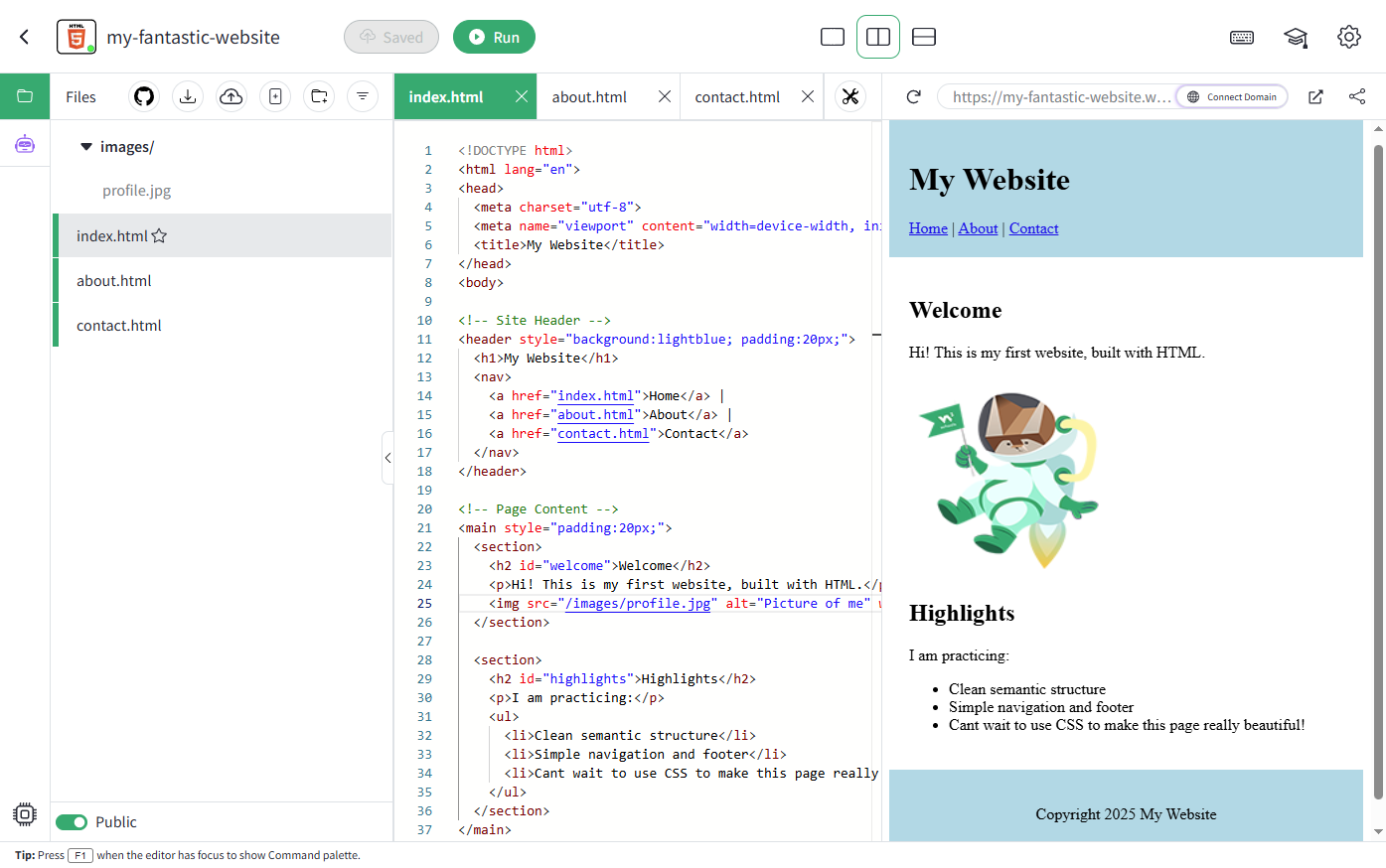
Congratulations! You've built and published your first real website using only HTML!
In the next chapter, you'll learn how to make your site look great with CSS - colors, layout, spacing, and more.

