w3schools
Search W3Schools :  
  
HOME HTML CSS XML JAVASCRIPT ASP PHP SQL MORE...   References Examples Forum About
YOUR FREE WEBSITE

Free Flash Website
Free Flash Templates
Free Web Design

CSS Basic

CSS HOME
CSS Introduction
CSS Syntax
CSS How To
CSS Background
CSS Text
CSS Font
CSS Box Model
CSS Border
CSS Outline
CSS Margin
CSS Padding
CSS List
CSS Table

CSS Advanced

CSS Dimension
CSS Classification
CSS Positioning
CSS Pseudo-class
CSS Pseudo-element
CSS Image Gallery
CSS Image Opacity
CSS Media Types
CSS Don't
CSS Summary

CSS Examples

CSS Examples

CSS References

CSS Reference
CSS Ref Alphabetical
CSS Ref Aural
CSS Units
CSS Colors
CSS Colorvalues
CSS Colornames

CSS Quiz

CSS Quiz
CSS Exam


CSS Syntax

Previous Next

Syntax

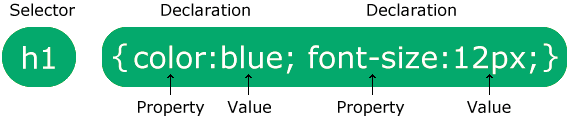
The CSS syntax is made up of three parts: a selector, a property and a value:

selector {property:value}

The selector is normally the HTML element/tag you wish to define, the property is the attribute you wish to change, and each property can take a value. The property and value are separated by a colon, and surrounded by curly braces:

body {color:black}

Note: If  the value is multiple words, put quotes around the value:

p {font-family:"sans serif"}

Note: If you want to specify more than one property, you must separate each property with a semicolon. The example below shows how to define a center aligned paragraph, with a red text color:

p {text-align:center;color:red}

To make the style definitions more readable, you can describe one property on each line, like this:

p
{
text-align:center;
color:black;
font-family:arial
}


Grouping

You can group selectors. Separate each selector with a comma. In the example below we have grouped all the header elements. All header elements will be displayed in green text color:

h1,h2,h3,h4,h5,h6
{
color:green
}


The class Selector

With the class selector you can define different styles for the same type of HTML element.

Say that you would like to have two types of paragraphs in your document: one right-aligned paragraph, and one center-aligned paragraph. Here is how you can do it with styles:

p.right {text-align:right}
p.center {text-align:center}

You have to use the class attribute in your HTML document:

<p class="right">This paragraph will be right-aligned.</p>
<p class="center">This paragraph will be center-aligned.</p>

Note: To apply more than one class per given element, the syntax is:

<p class="center bold">This is a paragraph.</p>

The paragraph above will be styled by the class "center" AND the class "bold".

You can also omit the tag name in the selector to define a style that will be used by all HTML elements that have a certain class. In the example below, all HTML elements with class="center" will be center-aligned:

.center {text-align:center}

In the code below both the h1 element and the p element have class="center". This means that both elements will follow the rules in the ".center" selector:

<h1 class="center">This heading will be center-aligned</h1>
<p class="center">This paragraph will also be center-aligned.</p>

Remark Do NOT start a class name with a number! It will not work in Mozilla/Firefox.


Add Styles to Elements with Particular Attributes

You can also apply styles to HTML elements with particular attributes.

The style rule below will match all input elements that have a type attribute with a value of "text":

input[type="text"] {background-color:blue}


The id Selector

You can also define styles for HTML elements with the id selector. The id selector is defined as a #.

The style rule below will match the element that has an id attribute with a value of "green":

#green {color:green}

The style rule below will match the p element that has an id with a value of "para1":

p#para1
{
text-align:center;
color:red
}

Remark Do NOT start an ID name with a number! It will not work in Mozilla/Firefox.


CSS Comments

Comments are used to explain your code, and may help you when you edit the source code at a later date. A comment will be ignored by browsers. A CSS comment begins with "/*", and ends with "*/", like this:

/*This is a comment*/
p
{
text-align:center;
/*This is another comment*/
color:black;
font-family:arial
}


Previous Next


W3Schools Certification

W3Schools' Online Certification Program

The perfect solution for professionals who need to balance work, family, and career building.

More than 3500 certificates already issued!

The HTML Certificate documents your knowledge of HTML, XHTML, and CSS.

The JavaScript Certificate documents your knowledge of JavaScript and HTML DOM.

The XML Certificate documents your knowledge of XML, XML DOM and XSLT.

The ASP Certificate documents your knowledge of ASP, SQL, and ADO.

The PHP Certificate documents your knowledge of PHP and SQL (MySQL).

 
WEB HOSTING
Best Web Hosting
PHP MySQL Hosting
Top 10 Web Hosting
UK Reseller Hosting
Web Hosting
FREE Web Hosting
WEB BUILDING
Website Templates
Flash Templates
Website Builder
Internet Business Opportunity
Get a Freelancer
Download XML editor
FREE Flash Website
FREE Web Templates
FLIGHT TICKETS
Find the cheapest flight
to any destination now!
EDUCATION
US Web Design Schools
HTML Certification
JavaScript Certification
XML Certification
PHP Certification
ASP Certification
STATISTICS
Browser Statistics
Browser OS
Browser Display
W3Schools.com HOME | TOP | PRINT | FORUM | ABOUT
W3Schools is for training only. We do not warrant the correctness of its content. The risk from using it lies entirely with the user.
While using this site, you agree to have read and accepted our terms of use and privacy policy.
Copyright 1999-2009 by Refsnes Data. All Rights Reserved.