w3schools
Search W3Schools :  
  
HOME HTML CSS XML JAVASCRIPT ASP PHP SQL MORE...   References Examples Forum About

XML Tree

« Previous Next Chapter »

XML documents form a tree structure that starts at "the root" and branches to "the leaves".


An Example XML Document

XML documents use a self-describing and simple syntax:

<?xml version="1.0" encoding="ISO-8859-1"?>
<note>
  <to>Tove</to>
  <from>Jani</from>
  <heading>Reminder</heading>
  <body>Don't forget me this weekend!</body>
</note>

The first line is the XML declaration. It defines the XML version (1.0) and the encoding used (ISO-8859-1 = Latin-1/West European character set).

The next line describes the root element of the document (like saying: "this document is a note"):

<note>

The next 4 lines describe 4 child elements of the root (to, from, heading, and body):

<to>Tove</to>
<from>Jani</from>
<heading>Reminder</heading>
<body>Don't forget me this weekend!</body>

And finally the last line defines the end of the root element:

</note>

You can assume, from this example, that the XML document contains a note to Tove from Jani.

Don't you agree that XML is pretty self-descriptive?


XML Documents Form a Tree Structure

XML documents must contain a root element. This element is "the parent" of all other elements.

The elements in an XML document form a document tree. The tree starts at the root and branches to the lowest level of the tree.

All elements can have sub elements (child elements):

<root>
  <child>
    <subchild>.....</subchild>
  </child>
</root>

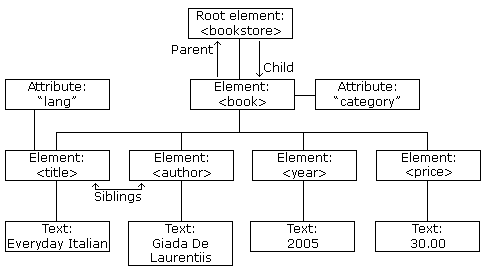
The terms parent, child, and sibling are used to describe the relationships between elements. Parent elements have children. Children on the same level are called siblings (brothers or sisters).

All elements can have text content and attributes (just like in HTML).


Example:

DOM node tree

The image above represents one book in the XML below:

<bookstore>
  <book category="COOKING">
    <title lang="en">Everyday Italian</title>
    <author>Giada De Laurentiis</author>
    <year>2005</year>
    <price>30.00</price>
  </book>
  <book category="CHILDREN">
    <title lang="en">Harry Potter</title>
    <author>J K. Rowling</author>
    <year>2005</year>
    <price>29.99</price>
  </book>
  <book category="WEB">
    <title lang="en">Learning XML</title>
    <author>Erik T. Ray</author>
    <year>2003</year>
    <price>39.95</price>
  </book>
</bookstore>

The root element in the example is <bookstore>. All <book> elements in the document are contained within <bookstore>.

The <book> element has 4 children: <title>,< author>, <year>, <price>.


« Previous Next Chapter »


1,050,724 Sites built with Wix. Make your own!

Click here to design a Stunning Flash Website for Free

Wix is a revolutionary web design tool that provides anyone with the possibility to create professional and beautiful websites for free.

With e-commerce features, search engine visibility and many more professional tools, Wix is the ultimate solution for creating a spectacular site while saving tons of money.


WEB HOSTING
Best Web Hosting
PHP MySQL Hosting
Top 10 Web Hosting
UK Reseller Hosting
Web Hosting
FREE Web Hosting
Top Web Hosting
Windows Hosting
WEB BUILDING
Download XML editor
FREE Flash Website
FREE Web Templates
Website Monetization
FLIGHT TICKETS
Find the cheapest flight
to any destination now!
EDUCATION
US Web Design Schools
HTML Certification
JavaScript Certification
XML Certification
PHP Certification
ASP Certification
STATISTICS
Browser Statistics
Browser OS
Browser Display
W3Schools.com HOME | TOP | PRINT | FORUM | ABOUT
W3Schools is for training only. We do not warrant the correctness of its content. The risk from using it lies entirely with the user.
While using this site, you agree to have read and accepted our terms of use and privacy policy.
Copyright 1999-2009 by Refsnes Data. All Rights Reserved.