HTML <meta> name Attribute
Example
Use the name attribute to define a description, keywords, and the author of an HTML document. Also define the viewport to control the page's dimensions and scaling for different devices:
<head>
<meta name="description" content="Free Web tutorials">
<meta name="keywords" content="HTML,CSS,JavaScript">
<meta name="author" content="John Doe">
<meta
name="viewport" content="width=device-width, initial-scale=1.0">
</head>
Try it Yourself »
The name attribute specifies the name for the metadata.
The name attribute specifies a name for the information/value of the
content attribute.
Note: If the http-equiv attribute is set, the
name attribute should not be set.
HTML5 introduced a method to let web designers take control over the
viewport (the user's visible area of a web page), through the
<meta> tag (See "Setting The Viewport" example below).
Browser Support
| Attribute | |||||
|---|---|---|---|---|---|
| name | Yes | Yes | Yes | Yes | Yes |
Syntax
<meta name="value">
Attribute Values
| Value | Description |
|---|---|
| application-name | Specifies the name of the Web application that the page represents |
| author | Specifies the name of the author of the document. Example:
<meta name="author" content="John Doe">
|
| description | Specifies a description of the page. Search engines can pick up this description to show with the results of searches. Example:
<meta name="description" content="Free web tutorials">
|
| generator | Specifies one of the software packages used to generate the document (not used on hand-authored pages). Example:
<meta name="generator" content="FrontPage 4.0">
|
| keywords | Specifies a comma-separated list of keywords - relevant to the page (Informs search engines what the page is about). Example:
<meta name="keywords" content="HTML, meta tag, tag reference">
|
| viewport | Controls the viewport (the user's visible area of a web page). The viewport varies with the device, and will be smaller on a mobile phone than on a computer screen. You should include the following <meta> viewport element in all your web pages:
<meta name="viewport" content="width=device-width, initial-scale=1.0">
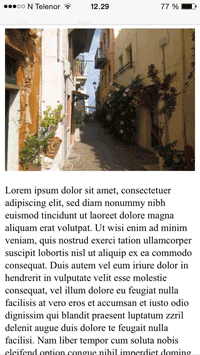
A <meta> viewport element gives the browser instructions on how to control the page's dimensions and scaling. The width=device-width part sets the width of the page to follow the screen-width of the device (which will vary depending on the device). The initial-scale=1.0 part sets the initial zoom level when the page is first loaded by the browser. Here is an example of a web page without the viewport meta tag, and the same web page with the viewport meta tag: Tip: If you are browsing this page with a phone or a tablet, you can click on the two links below to see the difference. You can read more about the viewport in our Responsive Web Design - The Viewport Tutorial. |

❮ HTML <meta> tag


