Canvas arc() Method
Example
Create a circle:
JavaScript:
const canvas = document.getElementById("myCanvas");
const ctx = canvas.getContext("2d");
ctx.beginPath();
ctx.arc(100, 75, 50, 0, 2 * Math.PI);
ctx.stroke();
Try it Yourself »
More examples below.
Description
The arc() method adds an arc (curve) to the path.
The arc() method creates a circle or a part of a circle.
Use the stroke() or fill() method to draw the path.
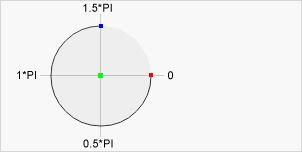 Center: arc(100, 75, 50, 0 * Math.PI, 1.5 * Math.PI)
Start angle: arc(100, 75, 50, 0, 1.5 * Math.PI)
End angle: arc(100, 75, 50, 0 * Math.PI, 1.5 * Math.PI)
Center: arc(100, 75, 50, 0 * Math.PI, 1.5 * Math.PI)
Start angle: arc(100, 75, 50, 0, 1.5 * Math.PI)
End angle: arc(100, 75, 50, 0 * Math.PI, 1.5 * Math.PI)
Note
To create a circle: Set start angle to 0 and end angle to 2*Math.PI.
To create half a circle: Set start angle to 0 and end angle to Math.PI.
See Also:
The beginPath() Method (Start a new path)
The closePath() Method (Close current path)
The moveTo() Method (Move the path to a point)
The lineTo() Method (Add a line to the path)
The fill() Method (Fill current path)
The stroke() Method (Draw current path)
The arcTo() Method (Add a circle to the path)
The bezierCurveTo() Method (Add a curve to the path)
The quadraticCurveTo() Method (Add a curve to the path)
Syntax
| context.arc(x, y, r, sAngle, eAngle, counterclockwise) |
Parameter Values
| Param | Description | Play it |
|---|---|---|
| x | The x-coordinate of the center of the circle | Play it » |
| y | The y-coordinate of the center of the circle | Play it » |
| r | The radius of the circle | Play it » |
| sAngle | The starting angle, in radians (0 is at the 3 o'clock position of the arc's circle) | Play it » |
| eAngle | The ending angle, in radians | Play it » |
| counterclockwise | Optional. Specifies whether the drawing should be counterclockwise or clockwise. False is default, and indicates clockwise, while true indicates counter-clockwise. | Play it » |
Return Value
| NONE |
More Examples
Example
Draw an orange circle:
JavaScript:
const canvas = document.getElementById("myCanvas");
const ctx = canvas.getContext("2d");
ctx.beginPath();
ctx.arc(100, 75, 50, 0, 2 * Math.PI);
ctx.fillStyle = "orange";
ctx.fill();
Try it Yourself »
Browser Support
The <canvas> element is an HTML5 standard (2014).
arc() is supported in all modern browsers:
| Chrome | Edge | Firefox | Safari | Opera | IE |
| Yes | Yes | Yes | Yes | Yes | 9-11 |
❮ Canvas Reference
