w3schools
Search W3Schools :  
  
HOME HTML CSS XML JAVASCRIPT ASP PHP SQL MORE...   References Examples Forum About
ADVERTISEMENT

Best Web Hosting
FREE Web Hosting
Web Hosting UK

CSS Basic

CSS HOME
CSS Introduction
CSS Syntax
CSS How To
CSS Background
CSS Text
CSS Font
CSS Box Model
CSS Border
CSS Outline
CSS Margin
CSS Padding
CSS List
CSS Table

CSS Advanced

CSS Dimension
CSS Classification
CSS Positioning
CSS Pseudo-class
CSS Pseudo-element
CSS Image Gallery
CSS Image Opacity
CSS Media Types
CSS Don't
CSS Summary

CSS Examples

CSS Examples

CSS References

CSS Reference
CSS Ref Alphabetical
CSS Ref Aural
CSS Units
CSS Colors
CSS Colorvalues
CSS Colornames

CSS Quiz

CSS Quiz
CSS Exam


CSS Font

Previous Next

CSS font properties define the font family, boldness, size, and the style of a text.


Difference Between Serif and Sans-serif Fonts
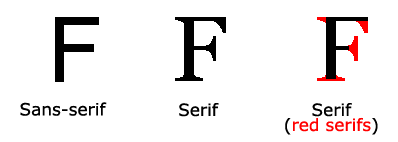
Serif vs. Sans-serif

Remark On computer screens, sans-serif fonts are considered easier to read than serif fonts.


CSS Font Families

In CSS, there is two types of font family names:

  • generic family - a group of font families with a similar look (like "Serif" or "Monospace")
  • font family - a specific font family (like "Times New Roman" or "Arial")
Generic family Font family Description
Serif Times New Roman
Georgia
Serif fonts have small lines at the ends on some characters
Sans-serif Arial
Verdana
"Sans" means without - these fonts do not have the lines at the ends of characters
Monospace Courier New
Lucida Console
All monospace characters has the same width


Font Family

The font family of a text is set with the font-family property.

The font-family property can hold several font names as a "fallback" system. If the browser does not support the first font, it tries the next font.

Start with the font you want, and end with a generic family, to let the browser pick a similar font in the generic family, if no other fonts are available.

Note: If the name of a font family is more than one word, it must be in quotation marks, like font-family: "Times New Roman".

More than one font family is specified in a comma-separated list:

Example

p{font-family:"Times New Roman",Georgia,Serif}

Try it yourself


Font Style

The font-style property is mostly used to specify italic text.

This property has three values:

  • normal - The text is shown normally
  • italic - The text is shown in italics
  • oblique - The text is "leaning" (oblique is very similar to italic, but less supported)

Example

p.normal {font-style:normal}
p.italic {font-style:italic}
p.oblique {font-style:oblique}

Try it yourself


Font Size

The font-size property sets the size of the text.

Being able to manage the text size is important in web design. However, you should not use font size adjustments to make paragraphs look like headings, or headings look like paragraphs.

Always use the proper HTML tags, like <h1> - <h6> for headings and <p> for paragraphs.

The font-size value can be an absolute, or relative size.

Absolute size:

  • Sets the text to a specified size
  • Does not allow a user to change the text size in all browsers (bad for accessibility reasons)
  • Absolute size is useful when the physical size of the output is known

Relative size:

  • Sets the size relative to surrounding elements
  • Allows a user to change the text size in browsers

Remark If you do not specify a font size, the default size for normal text, like paragraphs, is 16px (16px=1em).


Setting Text Size Using Pixels

Setting the text size with pixels, gives you full control over the text size:

Example

h1 {font-size:40px}
h2 {font-size:30px}
p {font-size:14px}

Try it yourself

The example above allows Firefox, Chrome, and Safari to resize the text, but not Internet Explorer.

The text can be resized in all browsers using the zoom tool (however, this resizes the entire page, not just the text).


Setting Text Size Using Em

To avoid the resizing problem with Internet Explorer, many developers use em instead of pixels.

The em size unit is recommended by the W3C.

1em is equal to the current font size. The default text size in browsers is 16px. So, the default size of 1em is 16px.

The size can be calculated from pixels to em using this formula: pixels/16=em

Example

h1 {font-size:2.5em} /* 40px/16=2.5em */
h2 {font-size:1.875em} /* 30px/16=1.875em */
p {font-size:0.875em} /* 14px/16=0.875em */

Try it yourself

In the example above, the text size in em is the same as the previous example in pixels. However, with the em size, it is possible to adjust the text size in all browsers.

Unfortunately, there is still a problem with IE. When resizing the text, it becomes larger than it should when made larger, and smaller than it should when made smaller.


Using a Combination of Percent and Em

The solution that works in all browsers, is to set a default font-size in percent for the body element:

Example

body {font-size:100%}
h1 {font-size:2.5em}
h2 {font-size:1.875em}
p {font-size:0.875em}

Try it yourself

Our code now works great! It shows the same text size in all browsers, and allows all browsers to zoom or resize the text!


Examples

More Examples

Set the boldness of the font
This example demonstrates how to set the boldness of a font.

Set the variant of the font
This example demonstrates how to set the variant of a font.

All the font properties in one declaration
This example demonstrates how to use the shorthand property for setting all of the font properties in one declaration.


All CSS Font Properties

The number in the "CSS" column indicates in which CSS version the property is defined (CSS1 or CSS2).

Property Description Values CSS
font
Sets all the font properties in one declaration font-style
font-variant
font-weight
font-size/line-height
font-family
caption
icon
menu
message-box
small-caption
status-bar
inherit
1
font-family
Specifies the font family for text family-name
generic-family
inherit
1
font-size
Specifies the font size of text xx-small
x-small
small
medium
large
x-large
xx-large
smaller
larger
length
%
inherit
1
font-style
Specifies the font style for text normal
italic
oblique
inherit
1
font-variant
Specifies whether or not a text should be displayed in a small-caps font normal
small-caps
inherit
1
font-weight
Specifies the weight of a font normal
bold
bolder
lighter
100
200
300
400
500
600
700
800
900
inherit
1


Previous Next


Altova® MissionKit® - Integrated Suite of XML tools

Altova MissionKit

The Altova MissionKit, recent winner of the Jolt Product Excellence and Productivity Award for Best Development Environment, is an integrated suite of tools ideal for:

  • XML development
  • Web & Web services development
  • Data mapping & integration
  • Rendering & publishing XML & database data
  • XBRL validation, taxonomy editing, transformation & rendering

The MissionKit for XML Developers includes XMLSpy®, MapForce®, and StyleVision® plus 3 additional tools for less than the price of 2.

Try all 6 products free for 30 days!

Download a fully-functional free trial

  Altova Missionkit


WEB HOSTING
Best Web Hosting
PHP MySQL Hosting
Top 10 Web Hosting
UK Reseller Hosting
Web Hosting
FREE Web Hosting
WEB BUILDING
Website Templates
Flash Templates
Website Builder
Internet Business Opportunity
Get a Freelancer
Download XML editor
FREE Flash Website
FREE Web Templates
FLIGHT TICKETS
Find the cheapest flight
to any destination now!
EDUCATION
US Web Design Schools
HTML Certification
JavaScript Certification
XML Certification
PHP Certification
ASP Certification
STATISTICS
Browser Statistics
Browser OS
Browser Display
W3Schools.com HOME | TOP | PRINT | FORUM | ABOUT
W3Schools is for training only. We do not warrant the correctness of its content. The risk from using it lies entirely with the user.
While using this site, you agree to have read and accepted our terms of use and privacy policy.
Copyright 1999-2009 by Refsnes Data. All Rights Reserved.