W3Schools
  home HOME Tutorials | References | Examples | Forum | About
Search W3Schools:

CSS Basic
CSS HOME
CSS Introduction
CSS Syntax
CSS How To
CSS Background
CSS Text
CSS Font
CSS Border
CSS Outline
CSS Margin
CSS Padding
CSS List
CSS Table

CSS Advanced
CSS Dimension
CSS Classification
CSS Positioning
CSS Pseudo-class
CSS Pseudo-element
CSS Image Gallery
CSS Image Opacity
CSS Media Types
CSS Don't
CSS Summary

CSS Examples
CSS Examples

References
CSS2 Reference
CSS2 Print
CSS2 Aural
CSS Units
CSS Colors
CSS Colorvalues
CSS Colornames

CSS Quiz
CSS Quiz
CSS Exam

Selected Reading
Web Statistics
Web Glossary
Web Hosting
Web Quality

W3Schools Tutorials
W3Schools Forum

Helping W3Schools

CSS Syntax

Previous Next

Syntax

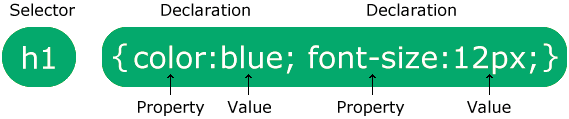
The CSS syntax is made up of three parts: a selector, a property and a value:

selector {property: value}

The selector is normally the HTML element/tag you wish to define, the property is the attribute you wish to change, and each property can take a value. The property and value are separated by a colon, and surrounded by curly braces:

body {color: black}

Note: If  the value is multiple words, put quotes around the value:

p {font-family: "sans serif"}

Note: If you wish to specify more than one property, you must separate each property with a semicolon. The example below shows how to define a center aligned paragraph, with a red text color:

p {text-align:center;color:red}

To make the style definitions more readable, you can describe one property on each line, like this:

p
{
text-align: center;
color: black;
font-family: arial
}


Grouping

You can group selectors. Separate each selector with a comma. In the example below we have grouped all the header elements. All header elements will be displayed in green text color:

h1,h2,h3,h4,h5,h6 
{
color: green
}


The class Selector

With the class selector you can define different styles for the same type of HTML element.

Say that you would like to have two types of paragraphs in your document: one right-aligned paragraph, and one center-aligned paragraph. Here is how you can do it with styles:

p.right {text-align: right}
p.center {text-align: center}

You have to use the class attribute in your HTML document:

<p class="right">
This paragraph will be right-aligned.
</p>
<p class="center">
This paragraph will be center-aligned.
</p>

Note: To apply more than one class per given element, the syntax is:

<p class="center bold">
This is a paragraph.
</p>

The paragraph above will be styled by the class "center" AND the class "bold".

You can also omit the tag name in the selector to define a style that will be used by all HTML elements that have a certain class. In the example below, all HTML elements with class="center" will be center-aligned:

.center {text-align: center}

In the code below both the h1 element and the p element have class="center". This means that both elements will follow the rules in the ".center" selector:  

<h1 class="center">
This heading will be center-aligned
</h1>
<p class="center">
This paragraph will also be center-aligned.
</p> 

Remark Do NOT start a class name with a number! It will not work in Mozilla/Firefox.


Add Styles to Elements with Particular Attributes

You can also apply styles to HTML elements with particular attributes.

The style rule below will match all input elements that have a type attribute with a value of "text":

input[type="text"] {background-color: blue}


The id Selector

You can also define styles for HTML elements with the id selector. The id selector is defined as a #.

The style rule below will match the element that has an id attribute with a value of "green":

#green {color: green}

The style rule below will match the p element that has an id with a value of "para1":

p#para1
{
text-align: center;
color: red
}

Remark Do NOT start an ID name with a number! It will not work in Mozilla/Firefox.


CSS Comments

Comments are used to explain your code, and may help you when you edit the source code at a later date. A comment will be ignored by browsers. A CSS comment begins with "/*", and ends with "*/", like this:

/* This is a comment */
p
{
text-align: center;
/* This is another comment */
color: black;
font-family: arial
}


Previous Next


Learn XML with <oXygen/> XML Editor - Free Trial!

oXygen - Probably The World's Best XML Editor   

oXygen helps you learn to define, edit, validate and transform XML documents. Supported technologies include XML Schema, DTD, Relax NG, XSLT, XPath, XQuery, CSS.

Understand in no time how XSLT and XQuery work by using the intuitive oXygen debugger!

Do you have any XML related questions? Get free answers from the oXygen XML forum and from the video demonstrations.

Download a FREE 30-day trial today!


Jump to: Top of Page or HOME or Printer Friendly Printer friendly page

W3Schools provides material for training only. We do not warrant the correctness of its contents. The risk from using it lies entirely with the user. While using this site, you agree to have read and accepted our terms of use and privacy policy.

Copyright 1999-2008 by Refsnes Data. All Rights Reserved.

Validate Validate W3C-WAI level A conformance icon W3Schools was converted to XHTML in December 1999