Websites often display content in multiple columns (like a magazine or
a newspaper).
Example
Cities
London
London is the capital city of England. It is the most populous city in the United Kingdom, with a metropolitan area of over 13 million inhabitants.
Standing on the River Thames, London has been a major settlement for two millennia, its history going back to its founding by the Romans, who named it Londinium.
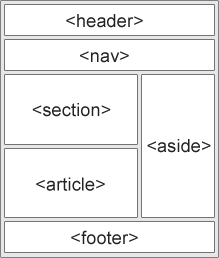
HTML has several semantic elements that define the different parts of a web page:
<header> - Defines a header for a document or a section <nav> - Defines a set of navigation links <section> - Defines a section in a document <article> - Defines independent, self-contained content <aside> - Defines content aside from the content (like a sidebar) <footer> - Defines a footer for a document or a section <details> - Defines additional details
that the user can open and close on demand <summary> - Defines a heading for the <details> element
<header> - Defines a header for a document or a section
You can create entire web layouts using the CSS
float property. Float is easy to learn
- you just need to remember how the float and
clear properties work.
Disadvantages: Floating elements are tied to the document flow, which may harm
the flexibility. Learn more about float in our CSS
Float and Clear chapter.
Example
Cities
London
London is the capital city of England. It is the most populous city in the United Kingdom, with a metropolitan area of over 13 million inhabitants.
Standing on the River Thames, London has been a major settlement for two millennia, its history going back to its founding by the Romans, who named it Londinium.
Use of flexbox ensures that elements behave predictably when the page layout
must accommodate different screen sizes and different display devices.
Learn more about flexbox in our
CSS Flexbox chapter.
Example
Cities
London
London is the capital city of England. It is the most populous city in the United Kingdom, with a metropolitan area of over 13 million inhabitants.
Standing on the River Thames, London has been a major settlement for two millennia, its history going back to its founding by the Romans, who named it Londinium.
The CSS Grid Layout Module offers a grid-based layout system, with rows and columns,
making it easier to design web pages without having to use floats and positioning.
Learn more about CSS grids in our
CSS Grid Intro chapter.