
JavaScript Temporal
JavaScript Temporal Reference
Temporal objects are the core part of the JavaScript Temporal API which aims to replace the old JavaScript Date object.
New to JavaScript Temporal Dates?
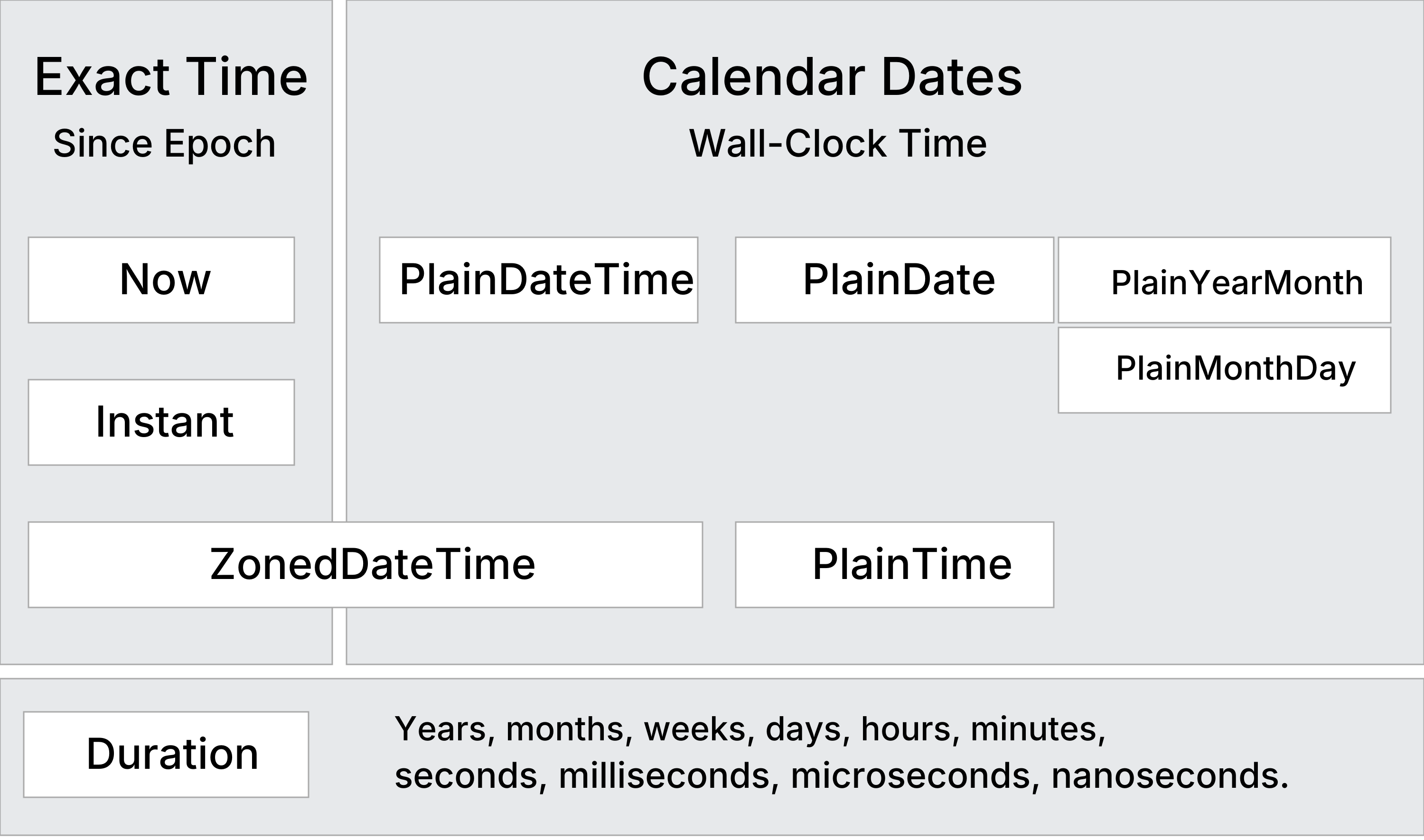
Temporal Objects
Revised March 2026
| Object | Description |
|---|---|
| Temporal.Duration | Length of time (days, hours, minutes) |
| Temporal.Now | Current time (UTC timestamp) |
| Temporal.Instant | A fixed point in time (UTC), independent of time zone |
| Temporal.ZonedDateTime | Date and time in a specific time zone |
| Plain Dates | |
| Temporal.PlainDate | Calendar date only (2026-05-21) |
| Temporal.PlainTime | Time of day only (14:30:00) |
| Temporal.PlainDateTime | Full date and time (2026-01-24 14:30:00) |
| Temporal.PlainYearMonth | Year and month only (2026-05) |
| Temporal.PlainMonthDay | Month and day only (05-01) |
Note
All Temporal objects are immutable.
This prevent bugs related to accidental modification of time values.
The Temporal.Duration Object
The Temporal.Duration object represents a length of time like 7 days and 1 hour.
The Temporal.Duration object makes date arithmetic clear, readable, and safer than using manual millisecond calculations.
Temporal.Duration Properties
The Temporal.Duration object has 12 properties of time information.
Temporal.Now
The Temporal.Now object has methods for getting the current time in various formats.
Use the Temporal.Now.zonedDateTimeISO() method for current system time:
Use the Temporal.Now.plainDateISO() method for calender date only:
Learn More:
The Temporal.Instant Object
The Temporal.Instant object represents a single point in time.
Temporal.Instant has no time zone or calendar.
Temporal.Instant stores a count of nanoseconds since the Unix epoch: January 1, 1970 00:00:00
Note
Nanosecond precision is 1000 times higher than the millisecond precision of the old Date object.
Temporal.ZonedDateTime
A Temporal.ZonedDateTime is a timezone and calendar-aware
date/time object that represents a real time event from the perspective of a particular
region on Earth.
Example: December 7th, 1995 at 3:24 AM in US Pacific time (in Gregorian calendar).
Example
const zonedDate = Temporal.ZonedDateTime.from({
timeZone: 'America/Los_Angeles',
year: 1995,
month: 12,
day: 7,
hour: 3,
minute: 24,
second: 30,
millisecond: 0,
microsecond: 3,
nanosecond: 500
});
Try it Yourself »
The Temporal.ZonedDateTime object is optimized for cases that
require a time zone, DST-safe arithmetic and interoperability with an RFC 5545 calendar.
Temporal Plain Objects
| Object | Description |
|---|---|
| Temporal.PlainDate | Calendar date only (2026-05-21) |
| Temporal.PlainTime | Time of day only (14:30:00) |
| Temporal.PlainMonthDay | Month and day only (05-01) |
| Temporal.PlainYearMonth | Year and month only (2026-05) |
The Temporal.PlainDate Object
The Temporal.PlainDate object represents a calendar date (year, month, and day)
without a specific time zone, typically in ISO 8601 format ("2026-05-01").
It is used for dates that remain the same regardless of time zone, such as birthdays or holidays.
Temporal.PlainDate Properties
The Temporal.PlainDate object has 16 properties of calendar date information.
The Temporal.PlainYearMonth Object
The Temporal.PlainYearMonth has 10 properties of calendar date information.
| Property | Description |
| calendarID | Calendar system identifier ("iso8601") |
| daysInMonth | The total number of days in that month |
| daysInYear | The total number of days in that year |
| era | The era name of the calendar, if applicable ("gregory") |
| eraYear | The year within the era, if applicable |
| inLeapYear | A boolean indicating if the date falls in a leap year |
| month | The month as an integer (1-12) |
| monthCode | A calendar-specific string code for the month ("M01") |
| monthsInYear | The total number of months in that year |
| year | The year as an integer |
The Temporal.PlainMonthDay Object
The Temporal.PlainMonthDay has 3 properties of calendar date information.
| Property | Description |
| calendarID | Calendar system identifier ("iso8601") |
| day | The day as an integer (1-31) |
| monthCode | A calendar-specific string code for the month ("M01") |
Note
The Temporal.PlainMonthDay object does not have a month property.
The Temporal.PlainTime Object
The Temporal PlainTime object is a time object with no date.
It represents an ISO 8601 wall-clock time without a date or time zone.
Example: 14:30:00.
Temporal.PlainTime Properties
The Temporal.PlainTime object has 6 properties of time information.
The Temporal.PlainDateTime Object
The Temporal.PlainDateTime object is a date and time object.
It represents a calendar date and a wall-clock time with no time zone.
Example: 2026-05-07T14:30:00.
Note
A PlainDateTime is essentially the combination of a Temporal.PlainDate() and a Temporal.PlainTime().
Temporal.PlainDateTime Properties
The Temporal.PlainDateTime object has 22 properties of calendar date information.
Temporal Arithmetic
| Method | Returns |
|---|---|
| temporal.add() | New temporal representing a date moved forward by a duration |
| temporal.subtract() | New temporal representing a date moved backward by a duration |
| temporal.round() | New temporal rounded down to specified unit |
Temporal Comparison
| Method | Description |
|---|---|
| temporal.compare() | Static method useful for sorting arrays of dates (returns -1, 0, or 1) |
| temporal.equals() | Returns true if two dates (and their calendars) are identical |
| temporal.since() | The duration between two temporal objects |
| temporal.until() | The duration between two temporal objects |
Learn More:
Browser Support
Temporal is a major update to the JavaScript standard (TC39).
It is currently supported in Chrome, Edge, Firefox, and Opera and is expected to reach full availability across browsers before the summer of 2026.
| Chrome 144 |
Edge 144 |
Firefox 139 |
Safari |
Opera 128 |
| Jan 2026 | Jan 2026 | May 2025 | 🚫 | Feb 2026 |
The Safari implementation can be tested in Safari Technology Preview by enabling the --use-temporal runtime flag.
Polyfill
Until Safari supports Temporal natively, you can use the official polyfill:
<script
src="https://cdn.jsdelivr.net/npm/@js-temporal/polyfill/dist/index.umd.js">
</script>







