
JavaScript Temporal Tutorial
What is JavaScript Temporal?
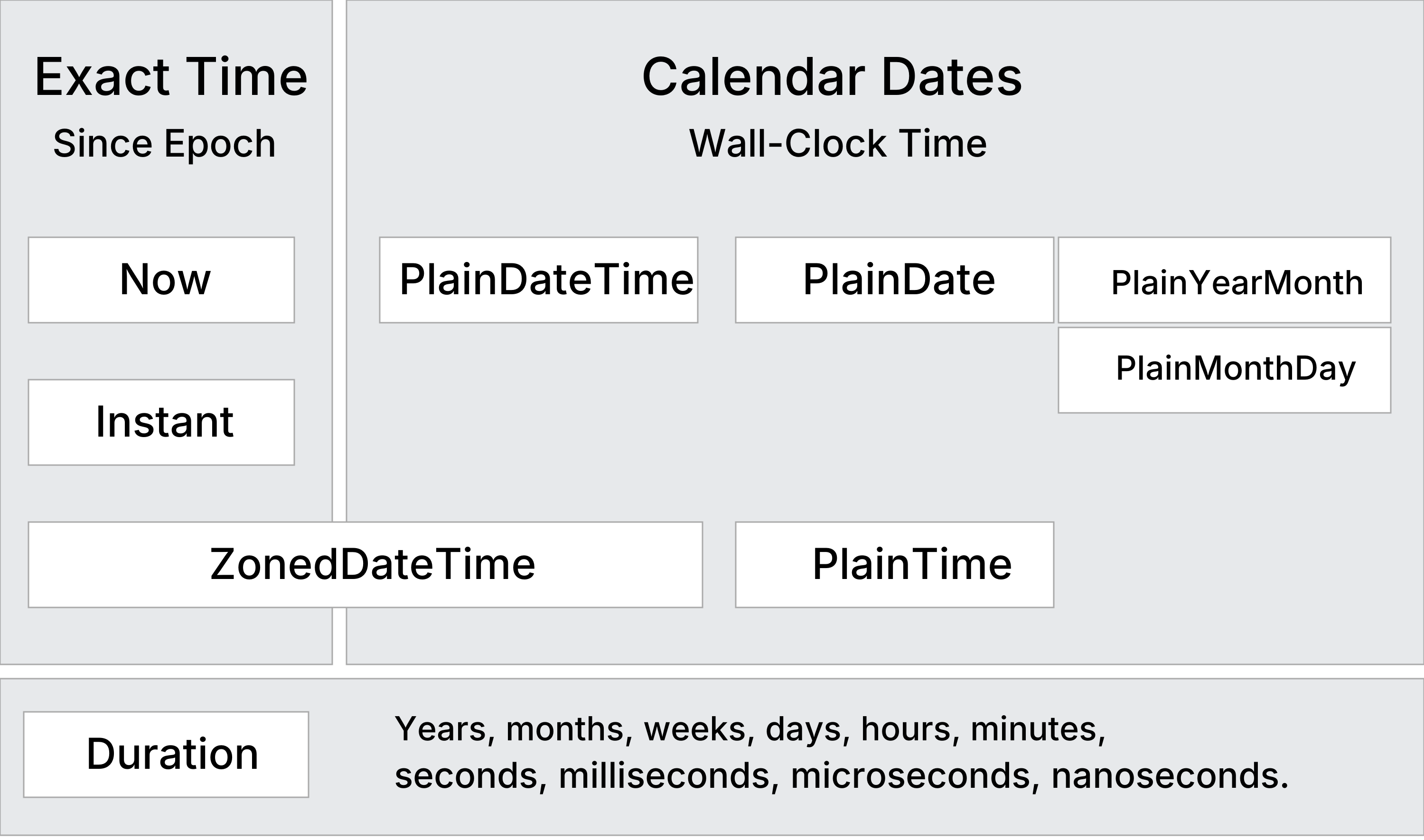
Temporal is the new standard for date and time in JavaScript.
New Temporal objects were designed to replace the old Date object.
Unlike legacy Date, Temporal objects are immutable and provide first-class support for time zones, daylight saving time, date arithmetic and non-Gregorian calendars.
Is Temporal JavaScript 2026?
Temporal reached TC39 Stage 4 in July 2026.
Stage 4 means the feature is complete and will be included in the next publication. An important timing detail is that ECMAScript 2026 had already been cut, and it did not contain Temporal.
Conclusion: Temporal is JavaScript 2027, not JavaScript 2026.
This can be slightly confusing because it became Stage 4 during 2026, and browsers began implementing Temporal long before before the ES2026 release.
Browser Support
Temporal is a major update to the JavaScript standard.
It is currently supported in Chrome, Edge, Firefox, and Opera and is expected to reach full availability across browsers before 2027.
| Chrome 144 |
Edge 144 |
Firefox 139 |
Safari |
Opera 128 |
| Jan 2026 | Jan 2026 | May 2025 | 🚫 | Feb 2026 |
The Safari implementation can be tested in Safari Technology Preview by enabling the --use-temporal runtime flag.
Polyfill
Until Safari supports Temporal natively, you can use the official polyfill:
<script
src="https://cdn.jsdelivr.net/npm/@js-temporal/polyfill/dist/index.umd.js">
</script>
Temporal Study Path
Learn JavaScript Temporal in the Right Order.
Temporal vs Date
Compare JavaScript Temporal and JavaScript Date.
Learn the differences between Date and Temporal
- Date months are 0-based, Temporal months are 1-based
- Date arithmetic is manual, Temporal is built-in
- Date mutates values, Temporal does not
- Date mixes UTC and time zones, Temporal separates them
- Date math can fail in DST handling, Temporal can not
Learn why Temporal is the modern alternative to Date.
Temporal.Duration
The Temporal.Duration object represents a length of time.
Example: 7 days and 1 hour.
The Temporal.Duration object includes these properties:
years, months, weeks, days, hours, minutes, seconds, milliseconds, and nanoseconds.
The Duration object is used to perform precise date and time arithmetic (e.g. add and subtract) without the bugs and complexity associated with the old JavaScript Date object.
What You Will Learn:
- How to use JavaScript Temporal.Duration
- How to represent and calculate lengths of time
- How to add and subtract days, hours, and months more safely
Temporal.Instant
The Temporal.Instant object represents an exact moment in UTC time.
It has NO time zone and NO calendar.
It stores nanoseconds since January 1, 1970 00:00:00 (Unix epoch).
Example: 2026-05-17T14:30:00Z
What You Will Learn:
- How to work with exact moments in time
- How to compare Instants
- How to convert from timestamps
- How to replace Date.now()
Temporal.PlainDateTime
The Temporal.PlainDateTime object is a pure date and time object.
It represents a calendar date and a wall-clock time with no time zone.
Example: 2026-05-07T14:30:00.
What You Will Learn:
- How to create a JavaScript Temporal.PlainDateTime
- How to work with date and time without a time zone
- How to add and subtract dates
- How to compare dates safely
Temporal.PlainDate
The Temporal.PlainDate object represents a calendar date without a time.
A Temporal.PlainDate is typically in ISO 8601 format (2026-05-01).
It is easier to use and safer to compare than DateTime objects for dates that are the same regardless of time zone, such as birthdays or holidays.
What You Will Learn:
- How to create a JavaScript Temporal.PlainDate
- How to work with dates without time
- How to add and subtract PlainDates
- How to compare dates safely
Temporal.PlainYearMonth
Temporal.PlainMontDay
The Temporal.PlainMonthDay Object
The Temporal.PlainMonthDay() object is a month and day object.
It represents the month and day of an ISO 8601 calendar, without a year or time.
Example: 05-17.
Temporal.PlainTime
The Temporal.PlainTime object is a time object without a date.
It represents an ISO 8601 wall-clock time without a date or time zone.
Example: 10:30:00.
It is useful for opening hours, alarms, and any time-only values.
Temporal.ZonedDateTime
The Temporal.ZonedDateTime object represents a date and time with a time zone.
It is the safest way to handle international date and time calculations.
It prevents common DST bugs and makes time zone conversions clear and predictable.
What You Will Learn:
- How to create a JavaScript Temporal.ZonedDateTime
- How to handle time zones correctly
- How to add and subtract ZonedDateTimes
- How to avoid DST (Daylight Saving Time) bugs
- How to convert between time zones safely
Temporal.Now
The Temporal.Now object provides 5 methods to get the system's date and time.
One method for each date object:
- Temporal.Now.instant()
- Temporal.Now.plainDateISO()
- Temporal.Now.plainTimeISO()
- Temporal.Now.plainDateTimeISO()
- Temporal.Now.zonedDateTimeISO()
Temporal Arithmetic
Temporal provides methods for easy and reliable date and time arithmetic.
Add and subtract days, months, years, and time without modifying the original.
Perform date arithmetic without DST bugs and Time Zone problems.
Temporal Since / Until
Calculate Temporal Differences
The since() method calculates the since duration between two dates.
The until() method calculates the until duration between two dates.
The since() and until() are effectivly the inverse of each other.
Temporal Compare
Date Comparison
In JavaScript, objects cannot be compared using operators like <, >, ==, or ===.
Always use the equals() or compare() methods rather than standard equality operators.
Temporal Conversion Rules
The table below shows how Temporal types can be converted:
| From | Plain Date |
Plain Time |
Plain DateTime |
Zoned DateTime |
Instant |
| PlainDate | No | Yes | No | No | |
| PlainTime | No | No | No | No | |
| PlainDateTime | Yes | Yes | Yes | No | |
| ZonedDateTime | Yes | Yes | Yes | Yes | |
| Instant | No | No | No | Yes |
Temporal Formats
Temporal dates can be serialized as strings in different ways:
| Method | Description |
|---|---|
| toString() | To a date string in the RFC 9557 / ISO 8601 format. |
| toLocaleString() | To language-sensitive string like "en-US". |
| Intl.DateTimeFormat() | When you need more control over the output. |
Temporal Standards
These are the Temporal Standards you need to know:
| Name | Description |
|---|---|
| ISO 8601 | International standard |
| RFC 3339 | Internet standard |
| RFC 9557 | Temporal standard |


