
Playwright Reporters
Playwright Reporters
A reporter decides how Playwright shows the results of a test run.
Some reporters print to the terminal, and some write a file, like an HTML page or a JSON file.
Playwright has these built-in reporters:
| Reporter | Output |
|---|---|
list | One line per test in the terminal. The default |
line | One line that updates while tests run |
dot | One character per test. The default on CI |
html | A web page with all results |
json | A JSON file for your own scripts |
junit | A JUnit XML file that CI servers can read |
blob | A zip file for merging the results of shards |
CI (Continuous Integration) is a server that runs your tests automatically, see the CI chapter.
The json, junit and blob reporters are covered in the File Reporters chapter.
Choose a Reporter
Set the reporter in playwright.config.js:
Example
playwright.config.js
export default defineConfig({
reporter: 'list',
});
Or choose one for a single run with --reporter:
Example
npx playwright test --reporter=dot
If both set a reporter, the command line is used.
The examples below run these four tests:
Example
tests/practice.spec.js
// @ts-check
import { test, expect } from '@playwright/test';
test('todo page has title', async ({ page }) => {
await page.goto('todo.html');
await expect(page).toHaveTitle(/Todo List/);
});
test('can add a todo', async ({ page }) => {
await page.goto('todo.html');
await page.getByPlaceholder('What needs to be done?').fill('Learn Playwright');
await page.getByRole('button', { name: 'Add' }).click();
await expect(page.getByTestId('todo-count')).toHaveText('1 item left');
});
test('student can log in', async ({ page }) => {
await page.goto('login.html');
await page.getByLabel('Username').fill('student');
await page.getByLabel('Password').fill('w3schools');
await page.getByRole('button', { name: 'Log in' }).click();
await expect(page.getByTestId('welcome')).toHaveText('Welcome, student!');
});
test('shop shows all products', async ({ page }) => {
await page.goto('shop.html');
await expect(page.getByTestId('product')).toHaveCount(5);
});
Terminal Reporters: list, line and dot
The list reporter prints one line per finished test, and how long it took:
Example
npx playwright test --reporter=list
Output:
Running 4 tests using 4 workers
ok 1 [chromium] › tests/practice.spec.js:4:1 › todo page has title (244ms)
ok 3 [chromium] › tests/practice.spec.js:24:1 › shop shows all products (204ms)
ok 4 [chromium] › tests/practice.spec.js:9:1 › can add a todo (750ms)
ok 2 [chromium] › tests/practice.spec.js:16:1 › student can log in (1.6s)
4 passed (3.2s)
The number after ok is the order in which the tests started.
The tests run in parallel, so they finish in a different order.
The line reporter uses one line that is updated while tests run.
In a terminal, each new line replaces the one before, so you only see the current test.
When the output goes to a file or a CI log, every line is kept, like here:
Example
npx playwright test --reporter=line
Output:
Running 4 tests using 4 workers
[1/4] [chromium] › tests/practice.spec.js:16:1 › student can log in
[2/4] [chromium] › tests/practice.spec.js:9:1 › can add a todo
[3/4] [chromium] › tests/practice.spec.js:24:1 › shop shows all products
[4/4] [chromium] › tests/practice.spec.js:4:1 › todo page has title
4 passed (3.3s)
The dot reporter prints one character per test.
It is short, which is good when you have many tests:
Example
npx playwright test --reporter=dot
Output:
Running 4 tests using 4 workers
····
4 passed (3.3s)
A passed test is a dot, a failed test is F.
All three reporters print the full error message of every failed test.
The HTML Reporter
The html reporter writes a web page to the playwright-report folder.
The config from npm init playwright uses it.
Open the last report with:
Example
npx playwright show-report
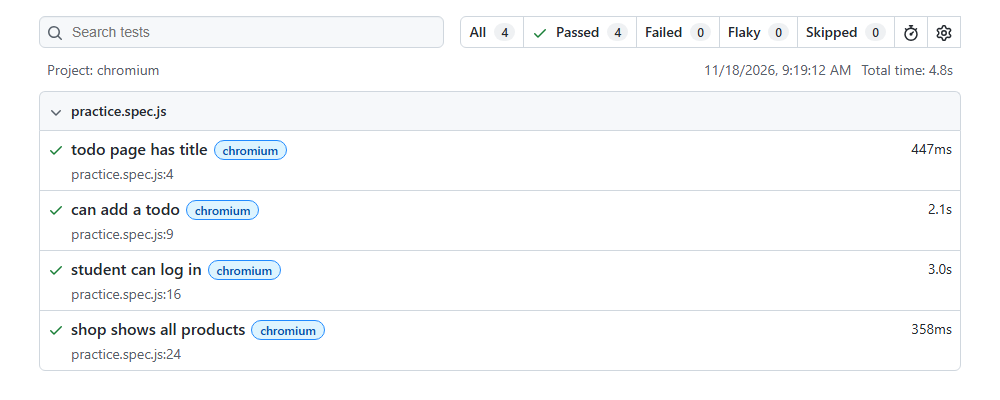
Use the search box and the filters at the top to find tests.
Click a test to see its steps, errors, screenshots, videos and traces.
The report opens by itself when a test fails.
Change that with the open option: 'always', 'never' or 'on-failure' (the default).
Example
playwright.config.js
reporter: [['html', { open: 'never' }]],







