
Playwright UI Mode
Playwright UI Mode
UI mode is a window where you run tests, watch each step, and run them again with one click.
This chapter also shows how to rerun only the tests that failed.
The examples use the project from the Running Tests chapter, with tests/todo.spec.js and tests/login.spec.js.
Open UI Mode
Open UI mode with the --ui option:
Example
npx playwright test --ui
On the left are your test files and tests.
Click the play button next to a test to run it, or the play button at the top to run all of them.
Click a test to see every step it took, with a picture of the page before and after each step:
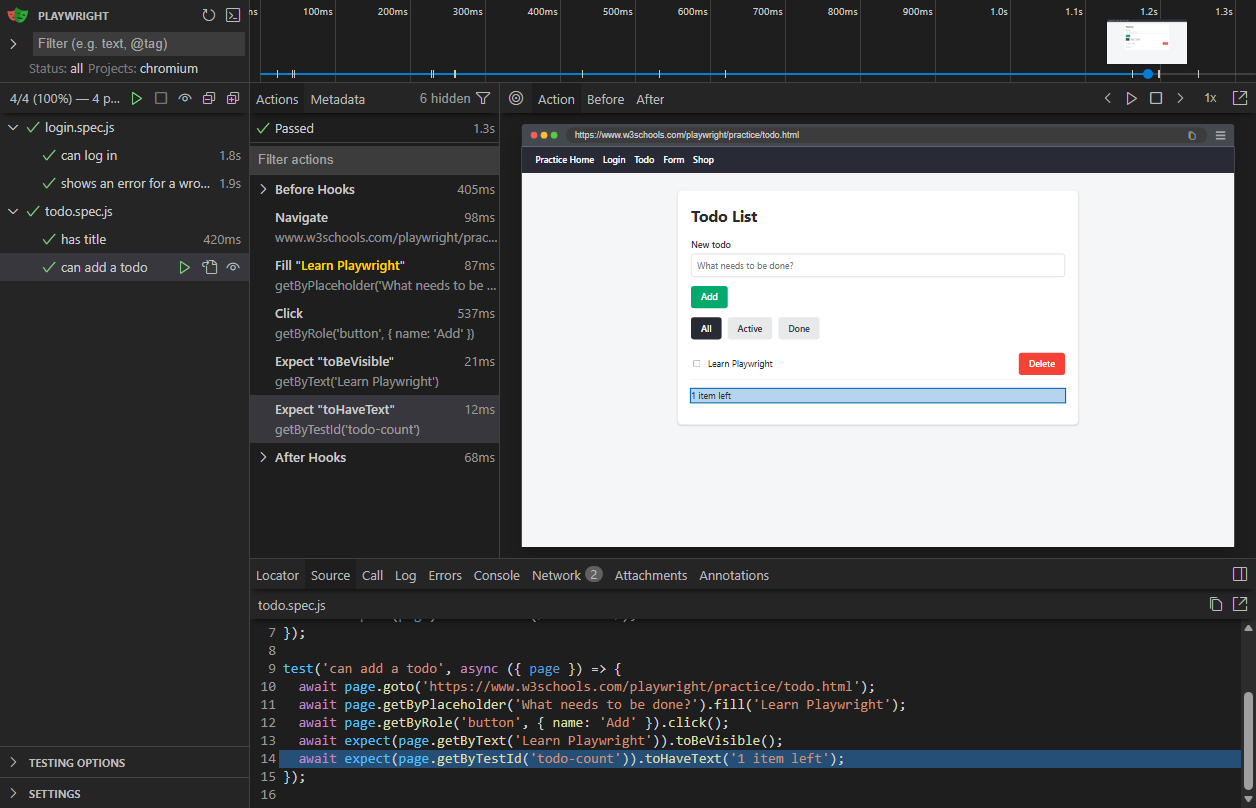
Click the eye icon next to a test to watch it: UI mode runs the test again every time you save the file.
UI mode is a good way to work while you write new tests.
Run Only the Failed Tests
In tests/login.spec.js, change the expected text in the test "shows an error for a wrong password" to 'Wrong password.', and run all tests:
Example
npx playwright test
Output:
Running 4 tests using 4 workers
[1/4] [chromium] › tests/todo.spec.js:9:1 › can add a todo
[2/4] [chromium] › tests/login.spec.js:12:1 › shows an error for a wrong password
[3/4] [chromium] › tests/todo.spec.js:4:1 › has title
[4/4] [chromium] › tests/login.spec.js:4:1 › can log in
1) [chromium] › tests/login.spec.js:12:1 › shows an error for a wrong password ───────────────────
Error: expect(locator).toHaveText(expected) failed
Locator: getByRole('alert')
Expected: "Wrong password."
Received: "Wrong username or password."
Timeout: 5000ms
1 failed
[chromium] › tests/login.spec.js:12:1 › shows an error for a wrong password ────────────────────
3 passed (7.2s)
Playwright remembers which tests failed.
Run only those tests again with --last-failed:
Example
npx playwright test --last-failed
Output:
Running 1 test using 1 worker
[1/1] [chromium] › tests/login.spec.js:12:1 › shows an error for a wrong password
1) [chromium] › tests/login.spec.js:12:1 › shows an error for a wrong password ───────────────────
Error: expect(locator).toHaveText(expected) failed
Locator: getByRole('alert')
Expected: "Wrong password."
Received: "Wrong username or password."
Timeout: 5000ms
1 failed
[chromium] › tests/login.spec.js:12:1 › shows an error for a wrong password ────────────────────
This is faster than running all tests while you fix a failure.
Playwright saves the list of failed tests in test-results/.last-run.json.







