
Git Clone from Bitbucket
Clone a Fork from Bitbucket
 GitHub
 Bitbucket
 GitLab
Note: The Bitbucket screenshots on this page show the default branch as master.
Bitbucket now names the default branch main, so you will see main where the screenshots show master.
Now we have our own fork, but only on
Bitbucket. We also want a
clone on our local Git to keep working on it.
A clone is a full copy of a repository, including all logging and versions of files.
Move back to the original repository, and click the "Clone" button to get the
URL to clone:

Open your Git bash and clone the repository:
Example
git clone https://bitbucket.org/w3schools-test/w3schools-test.bitbucket.io.git
Cloning into 'w3schools-test.bitbucket.io'...
remote: Counting objects: 31, done.
remote: Compressing objects: 100% (31/31), done.
remote: Total 31 (delta 17), reused 0 (delta 0)
Unpacking objects: 100% (31/31), 93.78 KiB | 51.00 KiB/s, done.
Take a look in your file system, and you will see a new directory named after the cloned project:
Example
ls
w3schools-test.bitbucket.io/
Note: To specify a specific folder to clone to, add the name of the folder after the repository
URL, like this:
git clone https://bitbucket.org/w3schools-test/w3schools-test.bitbucket.io.git myfolder
Navigate to the new directory, and check the status:
Example
cd w3schools-test.bitbucket.io
git status
On branch main
Your branch is up to date with 'origin/main'.

nothing to commit, working tree clean
And check the log to confirm that we have the full repository data:
Example
git log
commit 81c664c727643b638fcaf9906f2f8e820981b83d (HEAD -> main, origin/main, origin/HEAD)
Author: w3schools-test <test@w3schools.com>
Date:   Thu Apr 22 14:49:00 2021 +0200

    Updated index.html. Resized image

commit 9940ed410dc334a95900e7cf024040a1b8ef3d66
Author: w3schools-test <test@w3schools.com>
Date:   Thu Apr 22 12:40:01 2021 +0000

    Updated README.md with a line about focus

.....
Now we have a full copy of the original repository.
Configuring Remotes
Basically, we have a full copy of a repository, whose
origin we are not allowed to make changes to.
Let's see how the remotes of this Git is set up:
Example
git remote -v
origin  https://user@bitbucket.org/w3schools-test/w3schools-test.bitbucket.io.git (fetch)
origin  https://user@bitbucket.org/w3schools-test/w3schools-test.bitbucket.io.git (push)
We see that origin is set up to the original "w3schools-test" repository, we also want to add our own
fork.
First, we rename the original
origin remote:
Example
git remote rename origin upstream
git remote -v
upstream  https://user@bitbucket.org/w3schools-test/w3schools-test.bitbucket.io.git (fetch)
upstream  https://user@bitbucket.org/w3schools-test/w3schools-test.bitbucket.io.git (push)
Then fetch the URL of our own
fork:
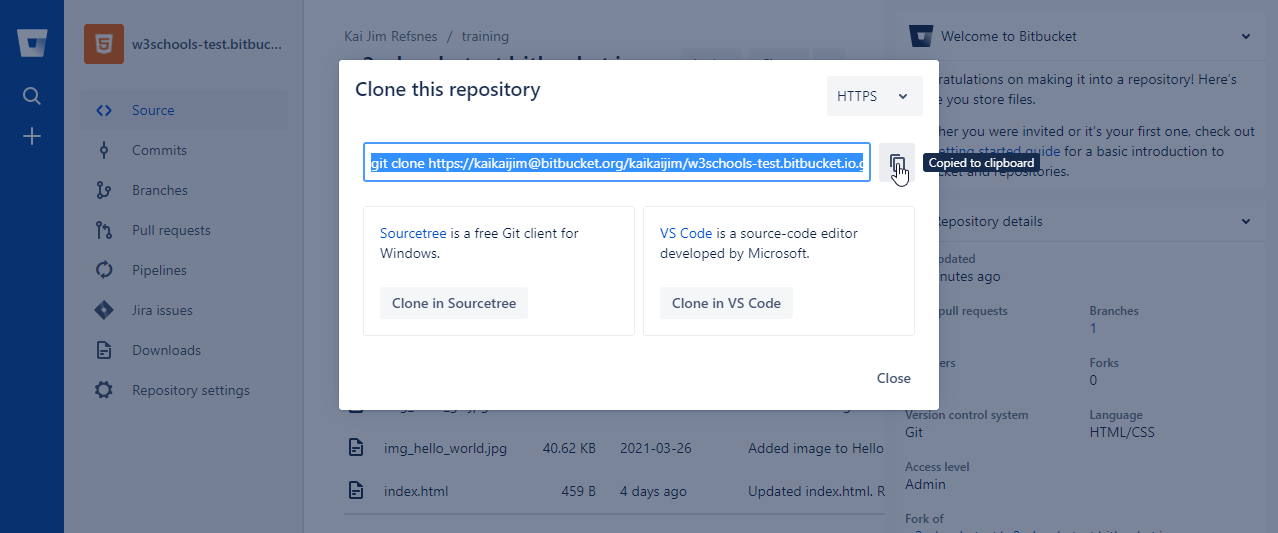
And add that as origin:
Example
git remote add origin https://user@bitbucket.org/user/w3schools-test.bitbucket.io.git
git remote -v
origin  https://user@bitbucket.org/user/w3schools-test.bitbucket.io.git (fetch)
origin  https://user@bitbucket.org/user/w3schools-test.bitbucket.io.git (push)
upstream        https://user@bitbucket.org/w3schools-test/w3schools-test.bitbucket.io.git (fetch)
upstream        https://user@bitbucket.org/w3schools-test/w3schools-test.bitbucket.io.git (push)
Note: According to Git naming conventions, it is recommended to name your own repository
origin, and the one you forked as
upstream.
Now we have 2 remotes:
origin- our ownfork, where we have read and write accessupstream- the original, where we have read-only access
Now we are going to make some changes to the code. In the next chapter, we will cover how we suggest those changes to the original repository.