
Git Bitbucket Pages
Enable Bitbucket Pages
 GitHub
 Bitbucket
 GitLab
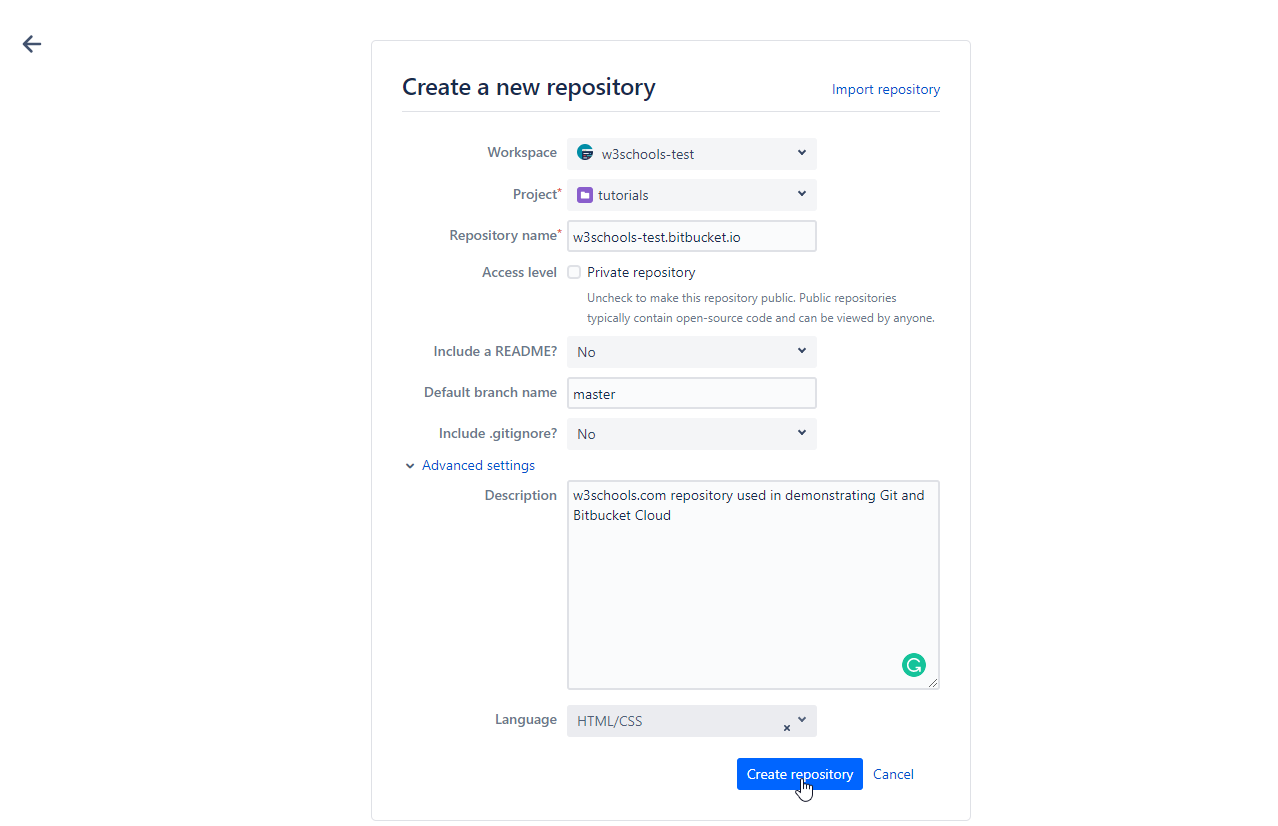
Note: The Bitbucket screenshots on this page show the default branch as master.
Bitbucket now names the default branch main, so you will see main where the screenshots show master.
Bitbucket Cloud lets you publish a website directly from your repository. To enable it:
- Create a new repository named
your-username.bitbucket.io. - Add your website files (like
index.html) to the repository. - Push your changes to Bitbucket.

Example
git remote add origin https://bitbucket.org/your-username/your-username.bitbucket.io.git
git push -u origin main
Set Source Branch/Folder
Bitbucket uses the main branch and the root folder by default for Bitbucket Pages. Make sure your site files are in the root of the repository and pushed to main.
View Your Site
After enabling Bitbucket Pages, your site will be available at https://your-username.bitbucket.io/ (or your custom domain).

Click the link to see your live site!
Disable Bitbucket Pages
Bitbucket Cloud has no setting to turn Pages off. It serves the repository named your-username.bitbucket.io, so to stop publishing:
- Delete the repository if you no longer need it, or
- Rename it in Repository settings, so it is no longer named
your-username.bitbucket.io.