
Git Pull from GitHub
Pull from Remote
In the last chapters, we made an account on GitHub and set up SSH.
Then we made some changes directly on GitHub.
Now we want to update our local repository with the changes from GitHub.
Key Pull Commands
Fetch, Pull and Merge
When working as a team on a project, it is important that everyone stays up to date.
Any time you start working on a project, you should get the most recent changes to your local copy.
With Git, you can do that with pull.
pull is a combination of 2 different commands:
fetchmerge
Let's take a closer look into how fetch, merge, and pull work.
Git Fetch
git fetch downloads new data from a remote repository, but does not change your working files or branches. It lets you see what others have pushed before you merge or pull.
Example
git fetch origin
remote: Enumerating objects: 5, done.
remote: Counting objects: 100% (5/5), done.
remote: Compressing objects: 100% (3/3), done.
remote: Total 3 (delta 2), reused 0 (delta 0), pack-reused 0
Unpacking objects: 100% (3/3), 733 bytes | 3.00 KiB/s, done.
From https://github.com/w3schools-test/hello-world
e0b6038..d29d69f main -> origin/mainNow that we have the recent changes, we can check our
status:
Example
git status
On branch main
Your branch is behind 'origin/main' by 1 commit, and can be fast-forwarded.
  (use "git pull" to update your local branch)

nothing to commit, working tree cleanWe are behind the origin/main by 1
commit. That should be the updated
README.md, but let's double check by viewing the
log:
Example
git log origin/main
commit d29d69ffe2ee9e6df6fa0d313bb0592b50f3b853 (origin/main)
Author: w3schools-test <77673807+w3schools-test@users.noreply.github.com>
Date:   Fri Mar 26 14:59:14 2021 +0100

    Updated README.md with a line about GitHub

commit e0b6038b1345e50aca8885d8fd322fc0e5765c3b (HEAD -> main)
Merge: dfa79db 1f1584e
Author: w3schools-test <test@w3schools.com>
Date:   Fri Mar 26 12:42:56 2021 +0100

    merged with hello-world-images after fixing conflicts

...
...That looks as expected, but we can also verify by showing the differences
between our local main and
origin/main:
Example
git diff origin/main
diff --git a/README.md b/README.md
index 23a0122..a980c39 100644
--- a/README.md
+++ b/README.md
@@ -2,6 +2,4 @@
 Hello World repository for Git tutorial
 This is an example repository for the Git tutoial on https://www.w3schools.com

-This repository is built step by step in the tutorial.
-
-It now includes steps for GitHub
+This repository is built step by step in the tutorial.
\ No newline at end of fileThat looks precisely as expected! Now we can safely merge.
Git Merge
merge combines the current branch, with a specified branch.
We have confirmed that the updates are as expected, and we can merge our current branch (main) with
origin/main:
Example
git merge origin/main
Updating e0b6038..d29d69f
Fast-forward
 README.md | 4 +++-
1 file changed, 3 insertions(+), 1 deletion(-)Check our status again to confirm we are up to date:
Example
git status
On branch main
Your branch is up to date with 'origin/main'.

nothing to commit, working tree cleanThere! Your local git is up to date!
Git Pull
But what if you just want to update your local repository, without going through all those steps?
pull is a combination of fetch and merge.
It is used to pull all changes from a remote repository into the branch you are working on.
Make another change to the README.md file on GitHub.
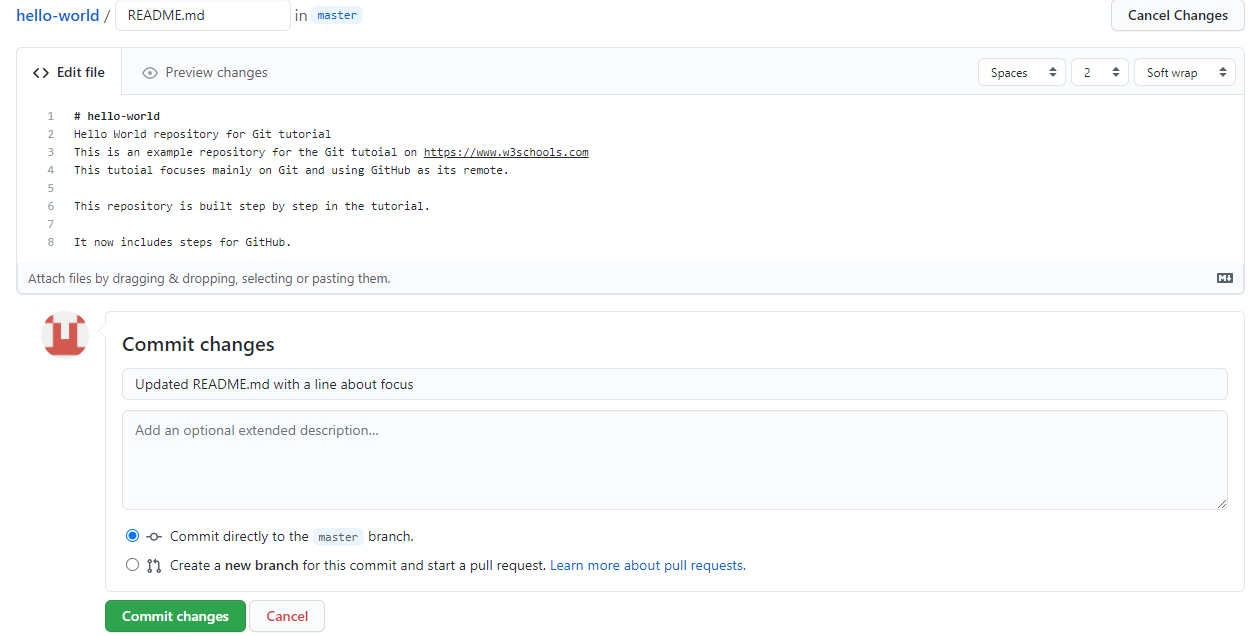
Use pull to update our local Git:
Example
git pull origin
remote: Enumerating objects: 5, done.
remote: Counting objects: 100% (5/5), done.
remote: Compressing objects: 100% (3/3), done.
remote: Total 3 (delta 1), reused 0 (delta 0), pack-reused 0
Unpacking objects: 100% (3/3), 794 bytes | 1024 bytes/s, done.
From https://github.com/w3schools-test/hello-world
   d29d69f..5a04b6f  main       -> origin/main
Updating d29d69f..5a04b6f
Fast-forward
 README.md | 2 ++
1 file changed, 2 insertions(+)That is how you keep your local Git up to date from a remote repository. In the next chapter, we will look closer at how
push works on GitHub.







