
Tkinter Entry
Text Fields
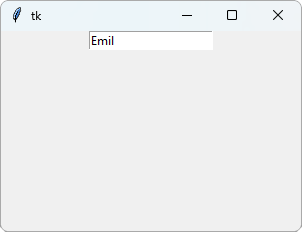
An Entry is a text field where the user can type one line of text:
Example
Create a text field:
import tkinter as tk
window = tk.Tk()
window.geometry("300x200")
entry = tk.Entry(window)
entry.pack()
window.mainloop()
Result:
After typing Emil in the text field:
Get the Text
Use get() to read what the user has typed:
Example
Say hello to the user:
import tkinter as tk
window = tk.Tk()
window.geometry("300x200")
def greet():
name = entry.get()
label.config(text="Hello, " + name)
entry = tk.Entry(window)
entry.pack()
button = tk.Button(window, text="Greet",
command=greet)
button.pack()
label = tk.Label(window)
label.pack()
window.mainloop()
Result:
After typing Emil and clicking Greet:
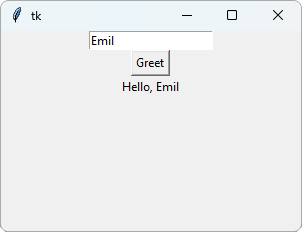
entry.get() returns the text in the text field, as a string.
Get a Number
get() always returns a string, even if the user types a number.
Use int() to turn it into a number:
Example
Double a number:
import tkinter as tk
window = tk.Tk()
window.geometry("300x200")
def double():
number = int(entry.get())
label.config(text=number * 2)
entry = tk.Entry(window)
entry.pack()
button = tk.Button(window, text="Double",
command=double)
button.pack()
label = tk.Label(window)
label.pack()
window.mainloop()
Result:
After typing 21 and clicking Double:
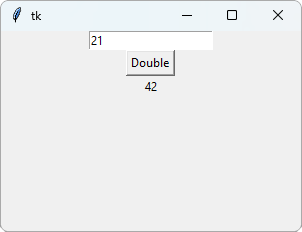
If the user types something that is not a whole number, int() gives an error.
You will learn how to handle that in the Tkinter Project chapter.
Clear the Text Field
Use delete() to remove the text from the text field:
Example
Clear the text field after the greeting:
import tkinter as tk
window = tk.Tk()
window.geometry("300x200")
def greet():
name = entry.get()
label.config(text="Hello, " + name)
entry.delete(0, tk.END)
entry = tk.Entry(window)
entry.pack()
button = tk.Button(window, text="Greet",
command=greet)
button.pack()
label = tk.Label(window)
label.pack()
window.mainloop()
Result:
After typing Emil and clicking Greet:
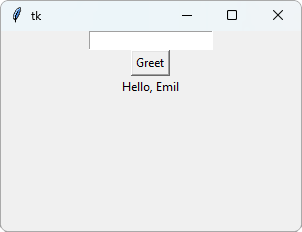
delete(0, tk.END) deletes everything, from the first character (0) to the end (tk.END).







