
Tkinter Events
What is an Event?
An event is something the user does, like pressing a key or clicking the mouse.
In the Tkinter Button chapter, command ran a function when a button was clicked.
With bind(), you can run a function for many other events.
Press Enter
Use bind() to connect an event to a function. "<Return>" is the event for the Enter key:
Example
Say hello when the user presses Enter:
import tkinter as tk
window = tk.Tk()
window.geometry("300x200")
def greet(event):
name = entry.get()
label.config(text="Hello, " + name)
entry = tk.Entry(window)
entry.pack()
entry.bind("<Return>", greet)
label = tk.Label(window)
label.pack()
window.mainloop()
Result:
After typing Emil and pressing Enter:
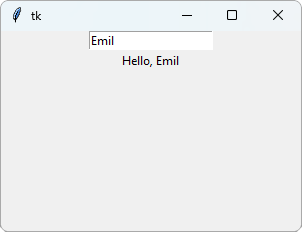
The function gets an event argument, with information about the event, like which key was pressed.
The function must have this argument, even if it does not use it.
bind() is called on the text field, so pressing Enter only works when the text field is active (the user has clicked in it).
Any Key
"<Key>" is the event for any key. event.keysym tells which key it was:
Example
Show which key was pressed:
import tkinter as tk
window = tk.Tk()
window.geometry("300x200")
def show_key(event):
label.config(text=event.keysym)
window.bind("<Key>", show_key)
label = tk.Label(window,
text="Press a key",
font=("Arial", 24))
label.pack()
window.mainloop()
Result:
After pressing the up arrow key:
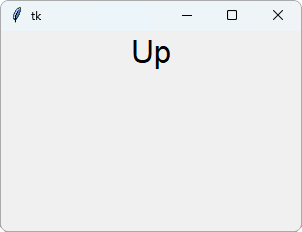
This time, bind() is called on window, so it works no matter which part of the window is active.
Mouse Clicks
"<Button-1>" is the event for a click with the left mouse button.
event.x and event.y tell where the click was, in pixels:
Example
Show where the user clicked:
import tkinter as tk
window = tk.Tk()
window.geometry("300x200")
def clicked(event):
pos = f"x={event.x}, y={event.y}"
label.config(text=pos)
window.bind("<Button-1>", clicked)
label = tk.Label(window,
text="Click anywhere")
label.pack()
window.mainloop()
Result:
After clicking in the window:
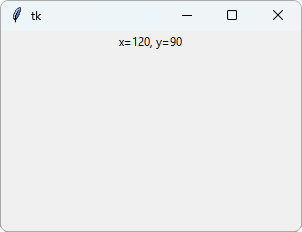
Note: In Tkinter, x and y are counted from the top left corner, and y grows downwards. This is different from turtle, where (0, 0) is in the middle and y grows upwards.
Common Events
| Event | Happens when |
|---|---|
| "<Return>" | The Enter key is pressed |
| "<Key>" | Any key is pressed |
| "<Up>", "<Down>", "<Left>", "<Right>" | An arrow key is pressed |
| "<Escape>" | The Esc key is pressed |
| "<Button-1>" | The left mouse button is clicked |
| "<Double-Button-1>" | The left mouse button is double-clicked |
| "<Motion>" | The mouse moves |







