
Tkinter Project
Guess the Number
In this chapter, you will use what you have learned to build a small game:
- The computer picks a secret number from 1 to 100
- The player types a guess, and clicks Guess
- The game says if the guess is too low or too high
- When the player finds the number, the game shows how many tries it took
You will build the game in five steps.
Step 1: The Window
First, create the window and the widgets: a question, a text field, a button, and an empty label for the result:
Example
The game window:
import tkinter as tk
import random
window = tk.Tk()
window.title("Guess the Number")
window.geometry("300x200")
question = "Guess a number from 1 to 100"
info = tk.Label(window, text=question)
info.pack(pady=10)
entry = tk.Entry(window)
entry.pack()
button = tk.Button(window, text="Guess")
button.pack(pady=10)
result = tk.Label(window)
result.pack()
window.mainloop()
Result:
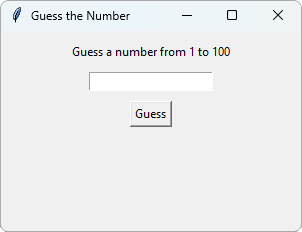
The button does nothing yet, and the result label is empty.
Step 2: Check the Guess
Now, pick a secret number with the random module, and add a function that compares the guess with the secret number:
Example
Check the guess:
import tkinter as tk
import random
window = tk.Tk()
window.title("Guess the Number")
window.geometry("300x200")
secret = random.randint(1, 100)
def check():
guess = int(entry.get())
if guess < secret:
result.config(text="Too low!")
elif guess > secret:
result.config(text="Too high!")
else:
result.config(text="Correct!")
question = "Guess a number from 1 to 100"
info = tk.Label(window, text=question)
info.pack(pady=10)
entry = tk.Entry(window)
entry.pack()
button = tk.Button(window, text="Guess",
command=check)
button.pack(pady=10)
result = tk.Label(window)
result.pack()
window.mainloop()
Result:
After guessing 50:
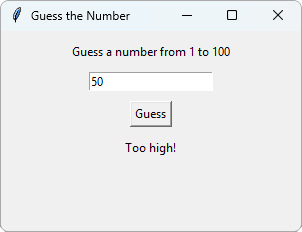
random.randint(1, 100) returns a random whole number from 1 to 100.
The button runs check() when it is clicked.
Step 3: Count the Tries
Add a variable that counts the guesses.
This time, the message is stored in msg, so result.config() is only written once, at the end of the function:
Example
Count the tries:
import tkinter as tk
import random
window = tk.Tk()
window.title("Guess the Number")
window.geometry("300x200")
secret = random.randint(1, 100)
tries = 0
def check():
global tries
guess = int(entry.get())
tries += 1
if guess < secret:
msg = "Too low!"
elif guess > secret:
msg = "Too high!"
else:
msg = f"Correct! Tries: {tries}"
result.config(text=msg)
question = "Guess a number from 1 to 100"
info = tk.Label(window, text=question)
info.pack(pady=10)
entry = tk.Entry(window)
entry.pack()
button = tk.Button(window, text="Guess",
command=check)
button.pack(pady=10)
result = tk.Label(window)
result.pack()
window.mainloop()
Result:
After guessing 50, 25 and 37 (the secret number was 37 this time):
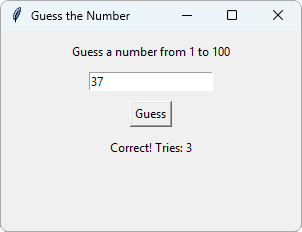
f"Correct! Tries: {tries}" is an f-string. It puts the value of tries into the text.
Step 4: Handle Wrong Input
If the player types something that is not a number, int() gives an error, and nothing happens in the window.
Use try and except to catch the error, and show a message instead:
Example
Handle wrong input:
import tkinter as tk
import random
window = tk.Tk()
window.title("Guess the Number")
window.geometry("300x200")
secret = random.randint(1, 100)
tries = 0
def check():
global tries
try:
guess = int(entry.get())
except ValueError:
result.config(text="Not a number!")
return
tries += 1
if guess < secret:
msg = "Too low!"
elif guess > secret:
msg = "Too high!"
else:
msg = f"Correct! Tries: {tries}"
result.config(text=msg)
question = "Guess a number from 1 to 100"
info = tk.Label(window, text=question)
info.pack(pady=10)
entry = tk.Entry(window)
entry.pack()
button = tk.Button(window, text="Guess",
command=check)
button.pack(pady=10)
result = tk.Label(window)
result.pack()
window.mainloop()
Result:
After typing abc and clicking Guess:
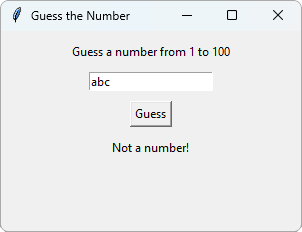
return ends the function early, so a wrong input does not count as a try.
Step 5: Press Enter to Guess
It is faster to press Enter than to click the button. Use bind() from the Tkinter Events chapter:
Example
Guess with the Enter key:
import tkinter as tk
import random
window = tk.Tk()
window.title("Guess the Number")
window.geometry("300x200")
secret = random.randint(1, 100)
tries = 0
def check():
global tries
try:
guess = int(entry.get())
except ValueError:
result.config(text="Not a number!")
return
tries += 1
if guess < secret:
msg = "Too low!"
elif guess > secret:
msg = "Too high!"
else:
msg = f"Correct! Tries: {tries}"
result.config(text=msg)
def check_on_enter(event):
check()
question = "Guess a number from 1 to 100"
info = tk.Label(window, text=question)
info.pack(pady=10)
entry = tk.Entry(window)
entry.pack()
button = tk.Button(window, text="Guess",
command=check)
button.pack(pady=10)
result = tk.Label(window)
result.pack()
entry.bind("<Return>", check_on_enter)
window.mainloop()
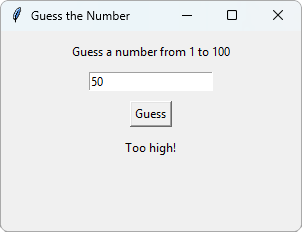
Result:
After typing 50 and pressing Enter:
check() has no arguments, so check_on_enter() takes the event, and calls check().
Keep Experimenting
Here are some ideas to make the game better:
- Clear the text field after each guess
- Show a message box when the player finds the number
- Add a "New game" button that picks a new secret number, and sets
triesback to 0
Tip: You can find a list of Tkinter widgets and methods in our Python tkinter Module Reference.







