
Tkinter To-Do List
A To-Do List App
In this chapter, you will build a To-Do List app:
- Type a task and click Add, and the task is added to the list
- Select a task and click Delete, and the task is removed
- Press Enter to add a task without clicking
The app uses widgets from earlier chapters: Entry, Button, Listbox and Frame.
Step 1: Add Tasks
The text field and the Add button are side by side in a Frame. The tasks are shown in a Listbox under them:
Example
Add tasks to a list:
import tkinter as tk
window = tk.Tk()
window.title("To-Do List")
window.geometry("300x250")
def add():
task = entry.get()
if task:
tasks.insert(tk.END, task)
entry.delete(0, tk.END)
top = tk.Frame(window)
top.pack(pady=10)
entry = tk.Entry(top, width=25)
entry.pack(side="left")
add_button = tk.Button(top, text="Add",
command=add)
add_button.pack(side="left", padx=5)
tasks = tk.Listbox(window, width=35,
height=8)
tasks.pack()
window.mainloop()
Result:
After adding three tasks:
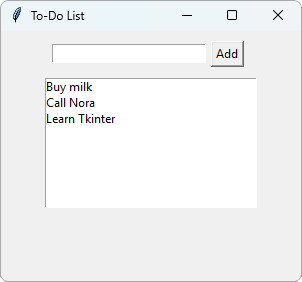
add() only adds the task if the text field is not empty. Then it clears the text field, ready for the next task.
Step 2: Delete Tasks
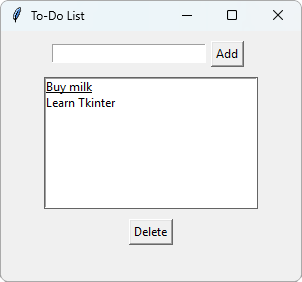
Add a Delete button that removes the selected task:
Example
Delete the selected task:
import tkinter as tk
window = tk.Tk()
window.title("To-Do List")
window.geometry("300x250")
def add():
task = entry.get()
if task:
tasks.insert(tk.END, task)
entry.delete(0, tk.END)
def delete():
selected = tasks.curselection()
if selected:
tasks.delete(selected[0])
top = tk.Frame(window)
top.pack(pady=10)
entry = tk.Entry(top, width=25)
entry.pack(side="left")
add_button = tk.Button(top, text="Add",
command=add)
add_button.pack(side="left", padx=5)
tasks = tk.Listbox(window, width=35,
height=8)
tasks.pack()
delete_button = tk.Button(window,
text="Delete",
command=delete)
delete_button.pack(pady=10)
window.mainloop()
Result:
After adding three tasks, selecting Call Nora and clicking Delete:
Step 3: Press Enter
Use bind() from the Tkinter Events chapter to add a task when the user presses Enter:
Example
Add a task with the Enter key:
import tkinter as tk
window = tk.Tk()
window.title("To-Do List")
window.geometry("300x250")
def add():
task = entry.get()
if task:
tasks.insert(tk.END, task)
entry.delete(0, tk.END)
def delete():
selected = tasks.curselection()
if selected:
tasks.delete(selected[0])
def add_on_enter(event):
add()
top = tk.Frame(window)
top.pack(pady=10)
entry = tk.Entry(top, width=25)
entry.pack(side="left")
add_button = tk.Button(top, text="Add",
command=add)
add_button.pack(side="left", padx=5)
tasks = tk.Listbox(window, width=35,
height=8)
tasks.pack()
delete_button = tk.Button(window,
text="Delete",
command=delete)
delete_button.pack(pady=10)
entry.bind("<Return>", add_on_enter)
window.mainloop()
Result:
After typing three tasks, and pressing Enter after each one:
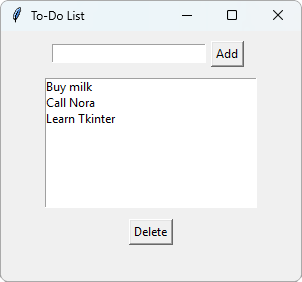
A function for an event gets an event argument, but add() has no arguments.
So add_on_enter() takes the event, and calls add().
Keep Experimenting
Here are some ideas to make the app better:
- Add a Clear button that deletes all the tasks with
tasks.delete(0, tk.END) - Show a message box if the user clicks Add when the text field is empty
- Delete a task when the user double-clicks it, with the
"<Double-Button-1>"event
Tip: You can find a list of Tkinter widgets and methods in our Python tkinter Module Reference.







